Alfred in his post below, 15 hours later, pointed to a web page where we read:
Unfortunately, as already stated twice, the e-mail account does not exist any more.
Alfred in his post below, 15 hours later, pointed to a web page where we read:
Unfortunately, as already stated twice, the e-mail account does not exist any more.
In principle it should be straightforward. One just decompiles the font, edits the resulting source code to change or add the resulting codepoints and, commonly, changes the font name, and then recompiles. There are, however, numerous complications if one wants to preserve all the behaviour:
I got round problems 1 and 2 by:
It turned out that I could just have used TTX as the decompiler and compiler. It is a little unfriendly for format 12 cmap tables. You have to provide many unnecessary attributes, so one ends up with an opening tag looking like:
<cmap_format_12 platformID="3" platEncID="10" format="12" reserved="0" length="1996" language="0" nGroups="165">
Fortunately, it seems that any positive values are acceptable for the length and nGroups attributes.
Thank you Richard for the font handling hints. I hope that you or somebody else will get the existing Tirhuta font to be Unicode conformant, ready for the keyboard layouts that will inevitably exist at some future stage of history (if relevant) for Maithili native speakers and scholars all around the world. Personally the font issue is far beyond of what I can do, given that I’ve never programmed the least standalone software, let alone a compiler. I’m just modifying keyboard driver C sources to some small extent. Here is an idea of what I’ve been able to do in the meantime:
Iʼve taken the Hindi Traditional Windows keyboard layout, and tried to get Excel match all Tirhuta characters thereupon, on the basis of the Unicode character names. As Richard W expected from the roadmap on, there are unsupported characters in Tirhuta, that do not match to any Devanagari character as present on the Hindi Traditional keyboard layout. As William suggested, Iʼll now post character lists, even if not complete ones, only the ones that are non-obvious to me.
The Tirhuta characters not matching Hindi Traditional Devanagari are the following twelve:
11480 TIRHUTA ANJI
11488 TIRHUTA LETTER VOCALIC RR
11489 TIRHUTA LETTER VOCALIC L
1148A TIRHUTA LETTER VOCALIC LL
114B6 TIRHUTA VOWEL SIGN VOCALIC RR
114B7 TIRHUTA VOWEL SIGN VOCALIC L
114B8 TIRHUTA VOWEL SIGN VOCALIC LL
114BA TIRHUTA VOWEL SIGN SHORT E
114BD TIRHUTA VOWEL SIGN SHORT O
114C4 TIRHUTA SIGN AVAGRAHA
114C5 TIRHUTA GVANG
114C6 TIRHUTA ABBREVIATION SIGN
On the other hand, there are Devanagari characters on the Hindi Traditional Windows keyboard layout that do not match any Tirhuta character. They are listed here:
0949 DEVANAGARI VOWEL SIGN CANDRA O
090D DEVANAGARI LETTER CANDRA E
0945 DEVANAGARI VOWEL SIGN CANDRA E
0911 DEVANAGARI LETTER CANDRA O
0931 DEVANAGARI LETTER RRA
0933 DEVANAGARI LETTER LLA
095F DEVANAGARI LETTER YYA
Now I guess that TIRHUTA LETTER VOCALIC LL and TIRHUTA LETTER VOCALIC RR might match DEVANAGARI LETTER LLA and DEVANAGARI LETTER RRA, which are in Shift of DEVANAGARI LETTER LA and DEVANAGARI LETTER RA on N and J keys, while AltGr places are left empty. So TIRHUTA VOWEL SIGN VOCALIC LL and TIRHUTA VOWEL SIGN VOCALIC RR in turn might take place in the AltGr shift state on these keys. After that, eight Tirhuta characters are left.
The problem with TIRHUTA LETTER VOCALIC L, that prevents it from being treated in the same manner, is that there is also a TIRHUTA LETTER LA, that matches DEVANAGARI LETTER LA, which is in the Base shift state where LLA is in Shift, that is on the N key. There is no other key with an L on Hindi Traditional. However, the key B to the left of LA and LLA is empty in Shift, so that we can put TIRHUTA LETTER VOCALIC L there and TIRHUTA VOWEL SIGN VOCALIC L above in AltGr, correspondingly to the above. After that, half of the unsupported Tirhuta characters are still left:
11480 TIRHUTA ANJI
114BA TIRHUTA VOWEL SIGN SHORT E
114BD TIRHUTA VOWEL SIGN SHORT O
114C4 TIRHUTA SIGN AVAGRAHA
114C5 TIRHUTA GVANG
114C6 TIRHUTA ABBREVIATION SIGN
TIRHUTA VOWEL SIGN SHORT E and TIRHUTA VOWEL SIGN SHORT O can be placed in AltGr on A and S keys above TIRHUTA VOWEL SIGN E and TIRHUTA VOWEL SIGN O which are in Base, and TIRHUTA LETTER E and TIRHUTA LETTER O which are in Shift, matching Devanagari counterparts there.
The TIRHUTA SIGN AVAGRAHA is not special of Tirhuta, as there is a DEVANAGARI SIGN AVAGRAHA too, encoded at U+093D, but not present on the Hindi Traditional keyboard layout as it ships with Windows. However, on the Windows Devanagari Inscript keyboard layout, it is in Shift+AltGr on the Period key, along with DEVANAGARI DOUBLE DANDA in AltGr, that is used in Tirhuta but not present on Hindi Traditional neither, which layout doubles the ASCII period and greater-than in these shift states.
The same applies to TIRHUTA ABBREVIATION SIGN, whose Devanagari version is U+0970 and is on AltGr+Comma on Devanagari Inscript. It can be mapped the same way on Tirhuta keyboard layout.
As for TIRHUTA ANJI by contrast, there is none in Devanagari, but well in Bengali, which script is mentioned as to be close to Tirhuta. But on none of the three Bengali layouts shipped with Windows, there is any U+0980 BENGALI ANJI.
And even more, the TIRHUTA GVANG is unique, as to date, there is no other gvang in any script encoded in Unicode.
Mapping these two characters needs some knowledge about their function and use, so that they may be placed on the appropriate key with respect to ASCII punctuation marks if applicable. There seems to be no ready information on the internet about them. Only based on their glyphic resemblance, I would place them on the same keys together with S (with respect to a stacked double long s) and W.
Then there is a list of characters borrowed from other scripts, additionally to danda and double danda, used in Tirhuta according to TUS §15.10:
09F4 BENGALI CURRENCY NUMERATOR ONE
09F5 BENGALI CURRENCY NUMERATOR TWO
09F6 BENGALI CURRENCY NUMERATOR THREE
09F7 BENGALI CURRENCY NUMERATOR FOUR
09F8 BENGALI CURRENCY NUMERATOR ONE LESS THAN THE DENOMINATOR
09F9 BENGALI CURRENCY DENOMINATOR SIXTEEN
1CF2 VEDIC SIGN ARDHAVISARGA
A830 NORTH INDIC FRACTION ONE QUARTER
A831 NORTH INDIC FRACTION ONE HALF
A832 NORTH INDIC FRACTION THREE QUARTERS
A833 NORTH INDIC FRACTION ONE SIXTEENTH
A834 NORTH INDIC FRACTION ONE EIGHTH
A835 NORTH INDIC FRACTION THREE SIXTEENTHS
A836 NORTH INDIC QUARTER MARK
A837 NORTH INDIC PLACEHOLDER MARK
A838 NORTH INDIC RUPEE MARK
A839 NORTH INDIC QUANTITY MARK
The first six are on the Bengali keyboard in AltGr and Shift+AltGr on A, S, and D keys. Thus there will be a collision with TIRHUTA VOWEL SIGN SHORT E and TIRHUTA VOWEL SIGN SHORT O on the first two keys. The AltGr shift state being mostly empty on letter keys, currency numerators and denominator might be either placed the same way as on Bengali but in the row above, on Q, W, and E keys, or shifted two keys to the right to end up on D, F, and G, or distributed over six keys in the row above, from Q through Y, all in AltGr (which would have been hard to achieve on the Bengali keyboard as there are already several AltGr key positions assigned).
VEDIC SIGN ARDHAVISARGA might be well mapped on the Minus key on which the visarga already is (in Shift), in AltGr because the minus sign there is already available in the Base shift state and has been doubled in AltGr to complete, by the principle of having in the two AltGr shift states the ASCII punctuations following the US-English layout.
To correctly map the North Indic number, quantity and currency signs, a Compose solution is generally the most appropriate. This does not require any dedicated Compose key, because Compose may technically be a simple dead key on whatever key position. This can be on AltGr+Space, because the ZWJ and ZWNJ are on the 1 and 2 keys on the Hindi layout, as Richard W already pointed, so that mapping them on the space bar is not required. This choice is an example of what should be subject to feedback in any case.
The problem with ligatures as a part of dead key sequences is resolved as soon as chained dead keys are available (like when .klc sources or C sources are edited and compiled by KbdUTool or directly by the compilers).
The Tirhuta digits, I suggest to place in the Base shift state, and ASCII digits in AltGr, not conversely as actually on the Hindi traditional layout. The clue is then to convert the unused CapsLock key to a KanaLock, which toggles the layout to a US-English one as currently used in India, following the method that I found yesterday on the KbdEdit web site, except that Tirhuta will be in Base, and English in Kana. If an English with CapsLock is desired (but improbably, given the amount of hate already accumulated on this toggle key by English users), English must be in Base, Tirhuta in Kana, and KanaLock on the uppermost leftmost key, that is not mapped in Hindi Traditional except for the ASCII grave and tilde characters, which will have to be remapped on AltGr+1 and AltGr+2, along with all AltGr key positions outside the letter keys, for some currency and technical characters, section and degree sign and so on.
The Numpad will be equally mapped on all eight shift states (which are ten in fact, if adding Ctrl and Shift+Ctrl, the latter of which is used in Hindi Traditional for ZWJ and ZWNJ). The choice there is between having Tirhuta in Base or in Shift, ASCII in Base or in Shift or in Kana only, and where to have super- and subscripts, hex letters lowercase and/or uppercase, and so on. Currency numerators and denominator may be on the numpad in AltGr shift states, or in Shift above Tirhuta digits, as an alternate solution avoiding dead keys (and the related Compose solution), which are said to be dreadful to many users who are not in the habits of using them. On the other hand, for a numpad without Tirhuta, I can apply the one I have available for French (and as far as the numpad is concerned, for universal Latin). That depends entirely on the expected usage.
But unlike what I supposed, I canʼt do it within one day, even when hoping not to spend one week, as I must finish the French keyboard layout within a useful delay too, and ethically as far as I am concerned—unlike most other people—this is prioritary in my work (however, ethics may turn out to show that I too should prioritize the Tirhuta keyboard layout, in which case I’ll conform).
Best,
Marcel
The Unicode code chart is available as follows.
The Tirhuta characters are U+11480..U+114C7, U+114D0..U+114D9.
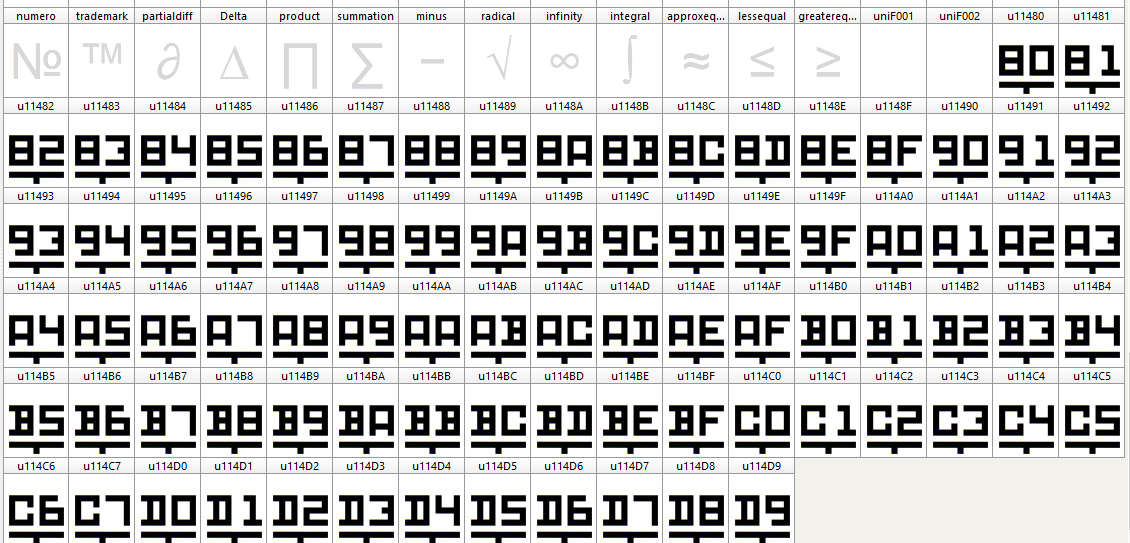
Would it be helpful in order to try to implement a keyboard layout to have a special test font as follows?
There are characters for U+11480..U+114C7, U+114D0..U+114D9 in the font, as well as a basic English alphabet.
The basic English alphabet is because in my experience fonts that do not have any characters within U+0021..U+007F can get into problems in use.
For each of the characters in the range U+11480..U+114C7, U+114D0..U+114D9 in the font, the glyph is not as in the charts but is simply the last two hexadecimal digits of the code point with a line beneath them so that the pairings are visually distinct.
This would mean that the code point of the intended character is clear when the character is displayed.
Such a font could be produced by someone who does not understand Tirhuta script.
Would such a special test font help?
Or would it be a distraction from what is trying to be achieved to have such a font produced?
William Overington
3 October 2015
No, they match DEVANAGARI LETTER VOCALIC LL and DEVANAGARI LETTER VOCALIC RR.
DEVANAGARI LETTER RRA is a precomposed letter, so if the equivalent occurred, it would not need its own key.
The lack of a Tirhuti letter LLA is more curious, and might be an omission from the standard. On the other hand, it can be covered by language-specific rules for reading DDA and DDHA as LLA and LL.HA.
Richard.
The unsupported Tirhuta characters are far less when Devanagari Inscript is used for a basis, first because key Z is missing on the Hindi Traditional layout (at least on Windows), as it does not appear in the C source, unlike on Devanagari Inscript. As key Z is not part of any of the three Bengali layouts shipped with Windows neither, this is obviously far from a bug. Hence one reason more to prefer Devanagari Inscript for a basis. It contains almost the same mapping as Hindi Traditional but includes several additional characters. Using Devanagari Inscript as shipped with Windows, only 2 Tirhuta characters are left unmapped and need special processing at layout creation:
11480 TIRHUTA ANJI
114C5 TIRHUTA GVANG
One sees that the major part of my previous post is completely useless, as the solution for mapping Tirhuta script on a keyboard layout for Windows consists in simply take the most complete Hindi layout shipped with Windows, and map Tirhuta correspondingly.
This raises however the question whether Bengali would be an even better choice, as it includes the currency numerators and denominator borrowed from Bengali for use in Tirhuta. But the Tirhuta match shows that Bengali unsupports nine Tirhuta characters instead of only the two as listed above. (The basis is obviously the Bengali layout, because Bengali Inscript and Bengali Inscript Legacy are inferior in keyboard level and character number.) The Bengali layout thus contributes the currency numerals, which Iʼve mapped in the Devanagari grid exactly like they are on Bengali, because the corresponding places were empty.
VEDIC SIGN ARDHAVISARGA has been mapped as projected, in AltGr on the Minus key on which the visarga already is (in Shift), because the minus sign there is already available in the Base shift state. On Hindi Traditional it is doubled in AltGr by the principle of having in the two AltGr shift states the ASCII punctuations following the US-English layout. This rule does not apply on Devanagari Inscript, where several Devanagari characters are mapped in the AltGr shift states, but no ASCII symbols nor punctuations. They are now available when Kana toggle (on CapsLock) is on.
For the mysterious ANJI and GVANG, there are even places left on S and W. But for the sake of Bengali currency numerals, the gvang could be mapped on J, as a stacked double turned dotless j, which from a Maithili point of view is complete nonsense of course. Nevertheless, and in lack of better knowledge, Iʼve mapped them as announced, TIRHUTA ANJI on AltGr + J, TIRHUTA GVANG on AltGr + W.
After that, the only characters left are the North Indic fractions and related symbols:
A830 NORTH INDIC FRACTION ONE QUARTER
A831 NORTH INDIC FRACTION ONE HALF
A832 NORTH INDIC FRACTION THREE QUARTERS
A833 NORTH INDIC FRACTION ONE SIXTEENTH
A834 NORTH INDIC FRACTION ONE EIGHTH
A835 NORTH INDIC FRACTION THREE SIXTEENTHS
A836 NORTH INDIC QUARTER MARK
A837 NORTH INDIC PLACEHOLDER MARK
A838 NORTH INDIC RUPEE MARK
A839 NORTH INDIC QUANTITY MARK
Their relatively little number and list structure allow a traditional mapping without Compose. The first six may be on the [1], [2], and [3] keys in a given shift state for quarters, and in another shift state for sixteenths. Next would come the QUARTER MARK, and the PLACEHOLDER and QUANTITY on the next two keys in the lower shift state. Which shift states exactly, depends on where digits are placed.
I believe that on a keyboard for a script that has digits, and where US-English is readily available as a whole (by pressing CapsLock as a Kana toggle), ASCII digits shouldnʼt be in the forefront. Further, like on Vietnamese keyboard on Windows, there is a strong habit of having digits in AltGr. So I suggest to swap Tirhuta and ASCII digits, so that the former end up in Base, and the latter in AltGr. But of course that can be cancelled after feedback.
That brings up the provisional mapping of North Indic numerals in the Shift and Shift + AltGr shift states on the digit keys, where Hindi Traditional and Devanagari Inscript have both the same six sequences, all of which have the Virama in second (5) or first (1) position, in the Shift shift state of keys [3] through [8]. These sequences cannot be shifted one key towards the right, because the parentheses are in Shift where they are on English layouts. Therefore, the one on key [3] has now been transferred to the uppermost rightmost key next to Backspace, to the right of Plus. The hardware used in India is often based on the Remington key layout, which as far as I understand, has this key removed from the middle row to the benefit of Enter, and placed in the digit row at the expense of Backspace. Hence the third view option in MSKLC.
These sequences (ligatures) are using the following characters:
114C2 TIRHUTA SIGN VIRAMA
1148F TIRHUTA LETTER KA
11496 TIRHUTA LETTER JA
11498 TIRHUTA LETTER NYA
1149E TIRHUTA LETTER TA
114A9 TIRHUTA LETTER RA
114AC TIRHUTA LETTER SHA
114AD TIRHUTA LETTER SSA
And they go as follows (‘\’ stands for the Virama):
Shift + (was:
Shift + 3): \ RA
Shift + 4: RA
Shift + 5: JA \ NYA
Shift + 6: TA \ RA
Shift + 7: KA \ SSA
Shift + 8: SHA \ RA
I understand that they are facilitating the input, allowing for parts like a mute R, TRA, KSSA, SHRA. Iʼm thankful to William for the introduction to the Virama, which favoured my approach of these ligatures. I must confess that first I overrode them, before correcting the layout the same day but a little later.
I now guess that the more ligatures there are, the faster the input. Much more can be added: In the relevant shift states, 47 key positions are still empty: 7 in Shift, 15 in AltGr, 25 in Shift + AltGr. Filling them up with ligatures brings however a memorization challenge. This is why they should be filled up by default, in case there are users interested in, and everybody may feel free to decide whether to learn where they are, or not. Thatʼs about the most a keyboard driver can do. Beyond is the domain of IMEs.
Beyond, on another plane, is the US-English keyboard layout that is included and is activated by pressing CapsLock, that is KanaLock.(Using SGCaps would have been sufficient for a US-English layout, and can be done if eight levels are needed for Tirhuta. Now some supplemental characters are available in AltGr on digit keys. But SGCaps would have the advantage of seeing the LED, which is not available for KanaLock on Occidental and likewise keyboards. Perhaps there is a way to program this in the driver. The extended numpad is included in turn.
It is essential to avoid switching between keyboard layouts for bilingual input such as HTML markup. Good web pages are best written directly in a text editor using the languages of the web (HTML, CSS, JavaScript, PHP and more), star web developer Rodolphe Rimelé writes in “HTML 5” (2013).
I was willing to implement a Compose tree, but unfortunately Iʼd no time to do this part of the job. I hope it will be done in the future. Iʼd no time left neither to run the tests, which would also have been a waste since no Unicode conformant font available. But I think it will work, as Iʼve checked all relevant parts of the sources, and similarly programmed drivers worked. Iʼm hopeful to recover this some day. Everybody may feel free to modify and recompile, sources are included, the workbook as well, but Iʼd no time to make the diagram, so Iʼve deleted the spreadsheets in this version. My aim is that everybody who does no evil, may come into the benefit of performative keyboard layouts. But I donʼt know the way to ensure this. Feedback is welcome, and I could link to this forum from http://charupdate.info. On this page one can find a fine licence agreement, that everybody is welcome to implement.
The Tirhuta_1 folder is for free download at:
http://bit.ly/1jJ9ais_Tirhuta_1
I hope it will be helpful.
Marcel
Effectively these are on Windows Devanagari Inscript, but not on Windows Hindi Traditional which I tried. The match is done, thank you.
Marcel
That is an excellent idea. This font will allow to test the keyboard layout I just placed on line. This can be achieved running Scanahand Premium on a customized template.
On the keyboard there are all Tirhuta characters extended, as listed in TUS §15.10, plus the ZWJ and ZWNJ, plus the ASCII punctuations that are common on Indic layouts, plus the lasting ASCII characters, plus a set of useful complements as § ° ² ³ ± µ £, plus —, –, and a few more. Plus the characters on the extended numpad, including operator symbols, superscripts, subscripts, arrows. But a good word processor is able to switch between fonts, so that it would be sufficient to have the subset used in Tirhuta extended.
This is not a distraction, as the aim is clearly experimental and helps developing keyboard drivers. It is effectively more useful to have such a font than a true font, because of the lacking knowledge on user side (related to myself).
I’m hopeful that this font is being created, and I look forward to testing and finishing the layout.
For this, layout specific feedback is expected, from everybody and namedly from the applicant.
Best regards,
Marcel
Thank you for your kind comments.
Here is a font.
EX11480A.TTF (21.7 KB)
Here is a picture, a Print Screen image made in FontCreator 8.0 and cropped in Microsoft Paint so as to show just the special glyphs.
The special glyphs are adapted from glyphs in my Pixel Polka font.
The basic English characters are copied directly from my Quest text font.
There is no copyright notice on the font, though I have put my name in it as follows in the Designer field of the font.
Produced by William Overington to try to help in developing a keyboard for the Tirhuta script.
The new font has the name EX11480A and is in a file EX11480A.TTF
The E is for Experimental, The X could be the second letter of Experimental or could mean Hexadecimal.
The 11480 is the hexadecimal start of the Tirhuta script in Unicode.
The A is because it is version A.
So if people using the font want anything added or altered I will try to do what I can and the next version will be B and so on until the adventure of making a keyboard for Tirhuta is solved.
Naming the file in this way means that the technique could be used for other scripts in the future while keeping file names distinct and meaningful.
William
Here is EX11480B.TTF which adds printing glyphs for ZWNJ and ZWJ.
I had some problems testing this font, possibly because WordPad on this Windows 8.0 computer is presuming zero width rather than the width that I have set.
I had a job using Insert Symbol Other… with Serif PagePlus X7 for ZWNJ and ZWJ but I got the printing glyphs in the end.
Anyway, here is the font.
EX11480B.TTF (21.9 KB)
William
Thank you for this font, I’ve downloaded it and the image, and hope to find the time of running the tests, which is very time-consuming. As soon as I’d finished the drivers and part of documentation yesterday, I continued the interactive overview of the French layout I’m working on. This diagram needs full font support for display, as it is without images.
I’ll post a link in the original thread, in case that Roshan does not follow up the split-off. That is wearisome and should not have been split off. As if what we posted was meant to be useless to him. I didn’t mean to waste time on a project that finally is not recieved. However it has brought me a certain experience.
I’m very grateful to William and Richard W for having introduced me to the secrets of Indic languages. It was very helpful for me to know something about the virama when manually converting the ligatures table of Devanagari Inscript / Hindi Traditional, and I remember William’s sentence quoted above.
All the best,
Marcel
[/color]
Thank you, this is very fine, so I can make sure that the keyboard layout inserts these characters. I’ve been really puzzled to find them in the Shift+Ctrl shift state, as this is normally avoided. However it is but one of the two stated positions Richard W mentioned. I’d set them rather in relation to the space bar, but as there is already a working tradition with keys 1 and 2, that’s fine as well. I remember that MSKLC does not allow for other than spacing characters on the space bar, but I didn’t test these two; as they are encoded next to the spaces, they might work. However I don’t use MSKLC on high level any more except to view keyboard layouts shipped with Windows, and to generate the initial .klc source with the properties and the package.
I’m not quite sure to test today, as I must finish the layout diagram for French. I haven’t yet installed the Tirhuta layout neither. It’s always wearisome to test, but that’s the same for everybody…
Marcel