Diacritical Marks, respectively Unicode

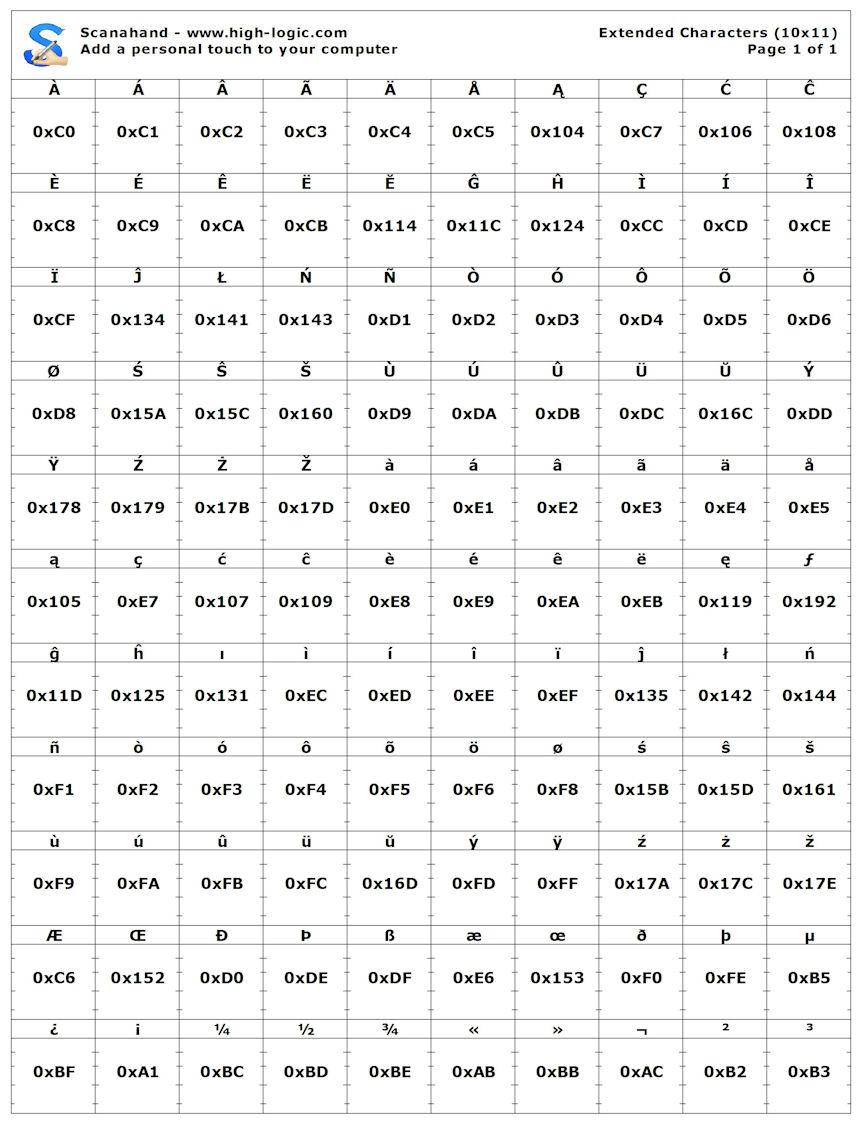
The latest version of the second template includes the following characters:
ÀÁÂÃÄÅĄÇĆĈ
ÈÉÊËĔĜĤÌÍÎ
ÏĴŁŃÑÒÓÔÕÖ
ØŚŜŠÙÚÛÜŬÝ
ŸŹŻŽàáâãäå
ąçćĉèéêëęƒ
ĝĥıìíîïĵłń
ñòóôõöøśŝš
ùúûüŭýÿźżž
ÆŒÐÞßæœðþµ
¿¡¼½¾«»¬²³

It covers:
English
German
Dutch
French
Italian
Swedish
Czech
Norwegian
Danish
Polish
Spanish
Portuguese
Basque
Estonian
Faeroese
Frisian
Irish
Galician
Hungarian
Icelandic
Albanian
Esperanto

I’m happy with this additional character set, so unless I receive additional suggestions, this will be it.

It covers:

Hungarian

I don’t see the Hungarian Ő, ő, Ű, and ű

Oops, good point :blush:

So now four out of these have to be removed:

¼½¾«»¬²³

I’ve added the missing Hungarian characters:

ÀÁÂÃÄÅĄÇĆĈ
ÈÉÊËĔĜĤÌÍÎ
ÏĴŁŃÑÒÓÔÕÖ
ŐØŚŜŠÙÚÛÜŬ
ŰÝŸŹŻŽàáâã
äåąçćĉèéêë
ęƒĝĥıìíîïĵ
łńñòóôõöőø
śŝšùúûüŭűý
ÿźżžÆŒÐÞßæ
œðþµ¿¡«»¬²

Not all Czech characters are included, so that one is now removed from the list.

The two page template still covers a lot of languages:
English, German, Dutch, French, Italian, Swedish, Norwegian, Danish, Polish, Spanish, Portuguese, Basque, Estonian, Faeroese, Frisian, Irish, Galician, Hungarian, Icelandic, Albanian and Esperanto.

I think Scanahand could be wonderful tool for as well hobbyist as professional. There seems not to be Scanahand like tool in the market, which “is full of” manual scan and trace glyph per glyph tools. These include professional softwares like Fontlab, Typetool, Scanfont and as I can see also Fontographer. FontCreator is also this like tool, with lack of automatic font generation using glyph templates. So with FontCreator it is hard work to make multi-lingual fonts.

Now we have one page template in Scanahand (Basic). Why should we restrict it’s possibilities to two page template and waste our time to think what glyphs to include in the second page?

Reasonable would be allow all characters in unicode, at least Basic Multilingual Plane (BMP) 000000..00FFFF (65536 glyphs). In practice there are only few font creators who needs these all in one font. Fonts has nearly always only some subset of unicode and nearly always only some subset of unicode blocks. For example Verdana covers the following 18 unicode blocks, but NONE of them inlcude all possible characters of the block. As we can see, Verdana has only 95 characters of 128 Basic Latin characters.

Basic Latin (95 of 128)
Latin-1 Supplement (96 of 128)
Latin Extended-A (128 of 128)
Latin Extended-B (11 of 208)
Spacing Modifier Letters (9 of 80)
Combining Diacritical Marks (5 of 112)
Greek and Coptic (73 of 127)
Cyrillic (94 of 255)
Latin Extended Additional (96 of 246)
General Punctuation (23 of 106)
Superscripts and Subscripts (1 of 34)
Currency Symbols (5 of 22)
Letterlike Symbols (6 of 79)
Number Forms (4 of 50)
Mathematical Operators (14 of 256)
Geometric Shapes (6 of 96)
Private Use Area (12 of 6400)
Alphabetic Presentation Forms (2 of 58)

The questions are:

  1. in which criteria to select unicode blocks to the new font
  2. in which criteria to select what characters to include from these blocks to the new font

Some reason there must be that the creator of Verdana has included only 21.7 % of general punctuation marks. Maybe he/she has thought that some chars are more essential or widely used than others.

One way to answer this is statistical way: to collect widely used fonts, calculate what blocks and portions of blocks are most common and use these results as the base for own font templates.

The technic that allows free selection of unicode ranges is simple. In the Scanahand the must be one embedded font that covers the whole unicode plane. At the beginning the Basic Multilingual Plane (BMP) 000000..00FFFF (65536 glyphs) is enough. Scanahand uses this font to print sample characters in the template pages.

If the program would use fixed page unicode ranges then the program would always know how to map the glyphs. But if we go to the dynamic user created glyph templates (which is really preferable), the solution is little more complicated.

When there is 1-10 dynamically created template pages, there must be some way to include the information of the page unicode ranges to the printable template page - without this page-related information it’s in practice not possible to map scanned glyphs to unicode mapping slots.

One of the best solutions is Data Matrix Barcode, which can include thousands of bytes information to small image. When the Matrix image that has encoded information of page’s character range is printed on the top of the page then Scanahand can decode the information back to the character range. Data Matrix has built-in error correction, so it is very tolerant to image noise (scan dust & scratches, misaligned lines in print etc.).

EDIT: Of course, I don’t mean that the fixed two page template is to be removed. I mean it’s not enough. So the user should have ability to select between fixed template(s) and dynamic template. The average user could select one of the fixed templates (or default template) and the advanced user could select one of the fixed templates and modify unicode ranges of it and use that modified dynamic template.

As the accented characters needed for Czech were mentioned. some readers might like to know of the following document.

This is one of many documents about the Unicode characters needed for setting text in the languages of Europe.

There is a huge list of links to those documents in section 1.2.2 Alphabetic index of languages, which is about half-way down the following page.

William Overington

11 August 2008

FontLab does offer a product like Scanahand — ScanFont — but it is $99 and still requires a Font Editor.

Professionals can use Scanahand to get their artwork into a font quickly, and then adjust the metrics and mappings in FontCreator. That is too much to expect of a budget-priced hobbyist’s program.

So with FontCreator it is hard work to make multi-lingual fonts.

Making multi-lingual fonts is hard work with any program.

Why should we restrict it’s possibilities to two page template and waste our time to think what glyphs to include in the second page?

Scanahand must be easy to use. It is designed for the beginner who knows nothing about Unicode or mappings. Professionals can use a program with all of the required features.

Reasonable would be allow all characters in unicode, at least Basic Multilingual Plane (BMP) 000000..00FFFF (65536 glyphs).

I have suggested before that mapping could be a separate process to scanning, but this would make Scanahand difficult to use for amateurs who don’t know about mapping. Though they could type “A” when they see “A” scanned as a glyph, they won’t know how to type extended Unicode glyphs. Typing accented glyphs like ä á å might not be too much to ask for European users who use a language-specific keyboard, but for others it would I think lead to more errors and frustration than filling in a template with just the extra glyphs that they want.

The method of filling in a template is almost idiot-proof and fast. Mapping individual glyphs would add considerably to the complexity and time required to make a font.

Generating custom templates on the fly by selecting glyphs from a character map or typing them from the keyboard is an interesting idea that might be viable. I don’t see it happening just yet though.

So masterly analysed and put by Bhikkhu Pesala.

I can only humbly agree.

Joe.

But Scanfont has not printable template page. It has Separate Shapes -function, but it doesn’t do what Scanahand do.

Scanahand does mappings fully.

Making multi-lingual fonts is hard work with any program.

With Scanahand it would be simple - if there were a simple way to select needed glyphs. (See at the bottom of this message)

Scanahand must be easy to use. It is designed for the beginner who knows nothing about Unicode or mappings. Professionals can use a program with all of the required features.

It would be really easy to select between few ready made templates or select languages - if the program is made simplicity in mind.

The user does this: select language(s) from dropdown
The program does this: languages (english, swedish, russian) → scripts (latin, armenian, cyrillic) → unicode ranges (x0000…xFFFF) → print as templete pages

User is so NOT needed to know mappings etc., he/she selects only language/languages.

The Scanahand can take care of glyph selection and mappings. There is for example this list of scripts used in languages:
http://www.unicode.org/cldr/data/charts/supplemental/scripts_and_languages.html

Also professionals has need for simple way to scan font and do the mappings. As far as I know there is no this like program for beginner or professional.

I have suggested before that mapping could be a separate process to scanning, but this would make Scanahand difficult to use for amateurs who don’t know about mapping.

Amateur or pro has no need to know about mappings. The program can do this.

Typing accented glyphs like ä á å might not be too much to ask for European users who use a language-specific keyboard, but for others it would I think lead to more errors and frustration than filling in a template with just the extra glyphs that they want.

The user has no need to type glyphs. He/she only writes these glyphs to template pages accorging to sample glyphs in template.

Mapping individual glyphs would add considerably to the complexity and time required to make a font.

The program can do the mapping in few milliseconds without frustration.

Generating custom templates on the fly by selecting glyphs from a character map or typing them from the keyboard is an interesting idea that might be viable. I don’t see it happening just yet though.

Glyph selection could be done in several ways:
a) one or few ready made templates for usual purposes (beginner)
b) language based selection
c) character map (visual table of glyphs) selection (beginner and professional)
d) typing characters by keyboard (beginner and professional)
e) unicode ranges by string (professional)

If there were a demo of these alternatives, it could be simple to say which one are best…

I like the language selection method best — use a different template for each language. That would permit a decent range of punctuation on each template — things like Smart Quotes, em-dashes, etc.

French needs only 40 extended glyphs, and most other languages need fewer than French. That leaves 70 spaces on each additional language template for other glyphs.

Some years ago there was a program available named Your Handwriting II which was produced by Data Becker.

William Overington

12 August 2008

I wonder if language selection could perhaps be implemented as an option with a language template being produced dynamically by reading in an XML file specifically for that language. For example, by reading in a file named French.xml in order to produce a template for French.

In that way, Scanahand could be supplied with a few such XML files and others could be added by an end user or downloaded from the Scanahand forum if other users of Scanahand uploaded their own XML files to the forum.

If the results were superimposable, then a font for, say, French, Portuguese and Latvian could be produced by producing templates from French.xml, Portuguese.xml and Latvian.xml, filling in the templates and then scanning in the templates. In the event of two glyphs for the same character being on two different templates, maybe Scanahand could prompt on-screen as to whether to keep the existing glyph or to use the new glyph: Scanahand discarding the glyph that is not chosen.

This approach would keep Scanahand straightforward for beginners yet also have the powerful ability to produce comprehensive fonts for any code points in the Unicode Basic Multilingual Plane.

Indeed, such a language selection facility could be used for other purposes as well, such as for including various symbols and accessing codepoints in the Unicode Private Use Area.

Scanahand would know how to allocate codepoints because the scan would be processed with respect to the same XML file as had been used to produce the template. Although templates would ideally have small glyphs printed on them as a guide, this would not be essential for an advanced user, as long as he or she had a chart of some sort (maybe just handwritten on the cardboard of the inside of an old cereal box) available so that he or she knew how to fill in the template.

All of the above could be implemented without affecting the including in Scanahand of both the basic template and also the second template being discussed in some of the earlier posts in this thread. I am just thinking of what could perhaps be done after inclusion of both of those templates has been achieved.

William Overington

12 August 2008

Huh! Here is now the “first” draft version of dynamic font template creation:

http://www.royalcomics.org/puhekupla/draw_template.php

It is not beautiful and logical but the idea of dynamic templates hopefully can be seen. With it you can
a) select glyphs by language (there may be mistakes)
b) Type unicode character ranges
c) Type glyphs as characters

Does this has some features that could be good to implement in Scanahand?

It uses pdflib for template creation and libdmtx for data matrix creation. In the top of every page there is little black white squares, which contain page related information (present only the character range of page).

EDIT: The count of rows and columns in template can be set. Reducing count of cells may help making Asian fonts, logos and other complex shapes.

That is very easy to use, and seems to work well. :slight_smile:

I made myself a Pali Template

I think the row/column count needs to be fixed at 10/11 for Scanahand to be able to interpret it correctly, so large fonts may not be possible, though a dynamic template is clearly better than a single fixed template.

Fine that the template generator works!

If Scanahand is going to dynamic templates, then there must be the Data Matrix Barcode at every page. In this barcode it is possible to store other page related properties such as
a) row and column count
b) various “metrics” of page (margin, page size, glyph title cell)
c) draftname for font
d) and of course unicode ranges of page

This information can gzipped or bzipped and in Barcode generation can be used Base 256 encoding (all byte values 0-255). In one barcode square is not reasonable to store too much data, because module size comes too little and when printed in inkjet the modules blend together and the reading and decoding of barcode will fail. That’s the reason why I chunked the data across multiple squares.

So if DT (Dynamic Templates) is being implemented in Scanahand and people have old not-barcoded templates that have 10x11 template, in these cases Scanahand uses default which is 10x11. So no problem!

I tried it for the preset English template and then I decided to experiment.

I tried Custom template (Type Unicode ranges) and used 59143-59252 so as to start with 59143 and use 110 code points.

Well, wow and wow again!

I saved the generated pdf to the local hard disc, copied it and renamed it as experimental.pdf and uploaded it to the web.

http://www.users.globalnet.co.uk/~ngo/experimental.pdf

I am amazed and delighted!

William Overington

12 August 2008

And there ARE many empty slots because of little incompleteness of the font. I had to select sample font that has nearly all of plane 0 covered. And this one has 63546 glyphs of 65536.

In my template creator demo there is no detection of control characters and other empty glyphs and missing ones of sample font. So it’s quick and dirty exemplary version.

I realized overnight that I had not explained my amazement and delight at the results of your experiment and that I should add a few notes for new readers of this forum, hoping that those readers who already knew about it would not mind it being repeated in this thread. Having this morning seen your post it seems a good idea to add the explanation as a reply.

Since the days of using metal type I have been interested in ligatures.

When I began to learn about electronic fonts I found that although glyphs for ligatures could be added, mapped to the Unicode Private Use Area, that there was a culture amongst some people that this should not be done and that no more glyphs for ligatures should be added to regular Unicode, and that ligature glyphs should be unmapped within a font and only be accessible using glyph substitution technology. The ligature glyphs in U+FB00 to U+FB06 only being included in Unicode for backward compatibility with some prior standard.

I thought that this missed out the very real fact that people using non-OpenType-aware software packages could not access ligature glyphs to produce printouts, so I decided to produce some code point allocations for ligature glyphs within the Unicode Private Use Area.

http://www.unicode.org/mail-arch/unicode-ml/y2002-m05/0223.html

Doug Ewell wrote as follows.

http://www.unicode.org/mail-arch/unicode-ml/y2002-m06/0422.html

The following two posts are from James Kass, the producer of the Code2000 font.

When I tried the range 59143-59252 I expected it to have all blank cells. I was amazed that there were any glyphs shown at all! Also I was reminded of the phrase “I laughed out loud” in the following post.

When I had looked at the English example and at the example which Bhikkhu Pesala posted, I had not realized that the Code2000 font was being used. So, it was with amazement that I saw the ct ligature glyph in the top left cell of the pdf which the system produced for me! Similar perhaps to when James Kass saw the ct ligature in the Unicode mailing list post from Doug Ewell in 2002.

Although those posts all happened in 2002 it seems to me that the use of Private Use Area codepoints for glyphs for ligatures is still needed in 2008, perhaps more needed now because there is, because of OpenType technology, more interest in glyphs for ligatures yet people without the very expensive packages cannot display them nor print them!

The following blog from Thomas Phinney may also be of interest to readers.

http://blogs.adobe.com/typblography/2006/05/eliminate_priva.html

Well, that is, in my opinion, a benefit and not a defect. Please do not change it.

Well, “quick” only because of your skill and ability to produce such excellent results. I would not be able to produce it in a month!

It is not “dirty”. In my opinion, it is a great step forward.

I have thought of a few matters that I would like to mention. Could you possibly consider making the inclusion of the guidelines across the cell an option please and making the glyph in the cell an option too please. People using black and white printers might get problems with scans having unwanted dark pieces in them.

Also, in Unicode, U+FFFE and U+FFFF (65534 and 65535) are non-characters. Could it be a useful convention that if someone uses 65535 in one of your templates that Scanahand then uses that glyph for the .notdef glyph of the font?

William Overington

13 August 2008
Now there is Guidelines on/off and Sample characters on/off:
http://www.royalcomics.org/puhekupla/draw_template.php?

What FontCreator mans are thinking about using Kahkonen-templates in Scanahand? Good or bad thing? If HighLogic thoughts it’s okay, then Scanahand should recognize automatically or get manual input few parameters of templates:
a) Unicode ranges of pages, eg. UnicodeRange = 33-44,68-78,40000
b) Column and Row count, eg. ColumnsRows = 10x11 (of course width so column count first)
c) Vertical metrics of slots (for example as percent of slot height. If slot height is 100%, vertical metrics could be e.g. [Windescent, Baseline, x-height, Capheight, Winascent] = [5.00, 20.43, 50.32, 70.83, 95.00]. In this case there would be 5% top and bottom margin, that will not be included in Glyph shape.
d) If Scanahand has not automatic template’s border recognition then also:

  • PageWidth
  • PageHeight
  • Top/Bottom/Left/Rightmargin
  • PageTitleCell Height
  • GlyphTitleCellHeight
  • BorderLineWidth
  • ShortGuidelineLength (meaning short horizontal black lines crossing column’s left and right borders)

and possibly:

  • SignatureCell parameters also. What is the reason for Signature in Scanahand?

So is this Dynamic Template going to be “a public standard”? It would be very interesting to develop such standard.