It is very easy, as long as the image is of high resolution and good contrast.
Scanahand makes it as easy as possible, while FontCreator offers more power and automation. PDF, SVG, or EPS images are ideal if available.
The screenshot shows your images in the Preview Toolbar, after pasting the image into FontCreator and splitting the glyphs into A, H, S, s, and combining caron and circumflex accents. I had to edit the image in IrfanView first to increase the contrast, or I could have adjusted the threshold if importing the image from disk.
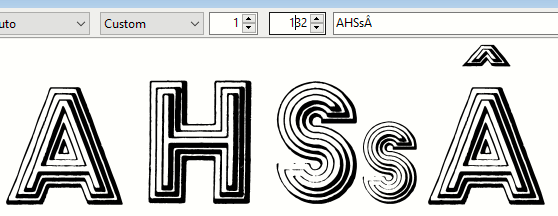
See the tutorials on Importing Images the Right Way - Size Does Matter and Scanning an Entire Alphabet (useful if creating a font from printed text).
Drag and Drop from Windows Explorer can be used to import multiple images at once. This is very fast if the images are vectors like PDF, SVG, or EPS.