String Length differs between Font Creator and Wordpad

When I preview a font using Font Creator’s preview function and view the same string in Wordpad (at the same point size) the lengths of the 2 strings is visually different.

In this specific case the wordpad string is longer by about a character over a 44 character string.

I’m writing a text / graphic application in VB .Net and this program gives a pixel lenght that agrees exactly with the length of the Font displayed in the Font Creator preview window. Wordpad and .Net’s GDI+ are drawing the font longer than the expected length.

(We’re using Font Creator to create TTF Fonts that marry up with postscript fonts used for final graphics output).

Although this is probably not a Font Creator issue per se, I’m wondering if anyone has come across this before or has any ideas? The issue exists with some fonts far more than others. Some point sizes within a specific font exagerate this effect more than other. Some fonts don’t seem to have this problem.

Thanks,

I think Wordpad doesn’t support kerning. That is the reason for the different line lengths.You can turn off kerning in the preview toolbar.

Thanks for the reply.

I tried turning off kerning on the preview window and noticed no difference. I don’t think this font is kerned…

I have noticed that the problem goes away when font sizes of 12 or 9 point are used. At point sizes of 16 and 24 the problem is minimal while at 8 and 11 and 14 points the problem is very noticable.

Not sure if that throws any light on it or not.

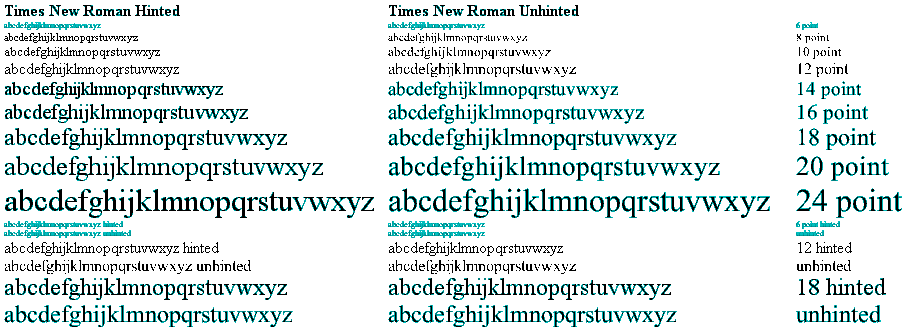
That happens with unhinted fonts IIRC.

I cannot reproduce it now, but I did have a similar problem with Wordpad.

Compare the line lengths of hinted and unhinted fonts at the bottom.

Yes, this is exactly the problem I’m having.

Being rather new to the issues behind fonts, can you give me some idea how I can “hint” my font so that it works consistantly? Any direction would be appreciated.

Thanks,

Please see the FAQ

Being rather new to the issues behind fonts, can you give me some idea how I can “hint” my font so that it works consistantly? Any direction would be appreciated.

Font Creator 5.0 does not support hinting. However, you might be able to improve things if you make each glyph a multiple of 256 font units wide.

Before doing that you might like to try your test using a copy of my Quest text font, where each glyph is a mulyiple of 256 font units wide so as to observe whether that produces any improvement at all, or maybe just at some sizes.

The font is available at the following address.

http://www.users.globalnet.co.uk/~ngo/QUESTTXT.TTF

There is a downloading link on the following web page.

However, I notice that you also wrote as follows.

(We’re using Font Creator to create TTF Fonts that marry up with postscript fonts used for final graphics output).

So, maybe my suggestion will not help at all. However, maybe it is worth having a look at, just in case it is helpful.

William Overington

Hi William,

Thanks for the post. I have downloaded your font and tried it. I found that at 14 points, the length of a text string displayed in Wordpad was longer than the same text string displayed in Font Creator’s Preview window. (By about 2/3 of a character in a 40 character string).

I presume as you created your font using FC5 that it does not contain any hints. Does this suggest then that there is some other reason why fonts display different lengths between the FC5 preview and Wordpad? Any ideas?

Thanks,

Well, I think I’ve solved it. Turns out to be a programming thing after all.

In case anyone else is interested in the programming aspects, when using .Net DrawString method, be sure to supply a format parameter set to GenericTypographic.

Dim s As StringFormat = StringFormat.GenericTypographic
g.DrawString(mystring, myBrush, Left, Top, s)

When this is done, the length of the font drawn does equal the length returned using e.Graphics.MeasureCharacterRanges.

Thanks all.

I noticed that you have posted again after your post to which I am now replying. I am pleased that your original problem is now resolved. Thank you for publishing the answer.

In relation to some points you raise, here are my thoughts. Hopefully they may be of help in some way.

Thanks for the post. I have downloaded your font and tried it. I found that at 14 points, the length of a text string displayed in Wordpad was longer than the same text string displayed in Font Creator’s Preview window. (By about 2/3 of a character in a 40 character string).

I presume as you created your font using FC5 that it does not contain any hints.

That is correct as such. However, I do use a technique of my own which I call mathematical pseudohinting whereby I line up some verticals and horizontals with a 256 font unit grid so as to make the on screen display more predictable at 12 point, 18 point and 24 point. That technique is, I feel, successful: however, it does mean that Quest text can look awful at some on screen sizes such as 14 point!

Does this suggest then that there is some other reason why fonts display different lengths between the FC5 preview and Wordpad? Any ideas?

Only in that as you mention the 14 point size and not the 12 point, 18 point and 24 point sizes, the thing is that Windows uses 4/3 times point size to give size in pixels. So 12 point is 16 pixels, 18 point is 24 pixels and 24 point is 32 pixels yet 14 point would be 18.667 pixels so rounding needs to take place. Point size is vertically, yet horizontally it is also 4/3 * point size * glyph width in font units / 2048 to give pixels. So a glyph 256 font units wide is 2 pixels at 12 point, 3 pixels at 18 point and 4 pixels at 24 point, yet would be 2.333 pixels at 14 point, so some rounding is needed. As Quest text has all glyphs a multiple of 256 font units wide, 12 point, 18 point and 24 point need no rounding, yet at 14 point, most would need some rounding. So, if the rounding were done differently as between programs using the font then different results might be obtained.

Quest text, due to its design rule of all glyphs being a multiple of 256 font units wide, may show the effect more than some other fonts.

Did Quest text respond to the test at 12 point, 18 point and 24 point with no difference in string length detectable please?

William
Hi William,

Thanks for the further information. Once I had changed my code, my application was able to consistantly display all fonts at the same length that font creator displayed them.

I tried to find a good definition for the StringFormat.GenericTypographic property that I used (and why you would need to set this property) but the microsoft documentation was less than helpful (they defined the property using the words Generic and Typographic which shed no new light on the situation). I e-mailed a comment on the documentation to them asking for clarification, but I don’t expect a reply.

I’m guessing that Word / Wordpad are making use of your hints, while FC5 and now my application do not.

Thanks for your support.
Cheers