- OT Designer: “remember last view” option switching between OTD and main window, it’s really time-consuming having to repeat the same action, i.e. returning to the last view to continue work, again and again
- OTD: display of various metrics in MarkPositioning and MarkToMarkPositioning - not editable, as in the main window, but as a reference point; at the very least LSB and RSB, but ideally a PointMode-like display of coordinates upon point selection:
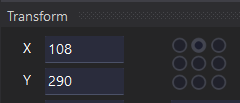
This would really speed up and optimise anchor placement.
- In ExportFont: Exclude empty glyphs option
- Support for the latest version of the Unicode Standard (currently several chars from Latin Extended-D and Combining Diacritical Marks Extended are undefined)
Also, I’d like to reiterate my post from 2022: 
-
Copy&paste individual anchors
-
Add/delete anchor for multiple selected glyphs as the same time
-
Edit anchor in multiple selected glyphs as the same time
-
Sorting anchor order; manually moving anchors up/down the list
-
Info which OT features use selected anchor (in Anchor Manager)
-
Info which OT feature uses selected anchor (in Anchors Panel of selected glyph)
-
Comment/Notes field for individual anchors in Anchor Manager
-
Comments/Notes field for individual instances of features in OT Designer - since using Code Editor overwrites names & classes, it would be a half-measure to manually restoring them afterwards