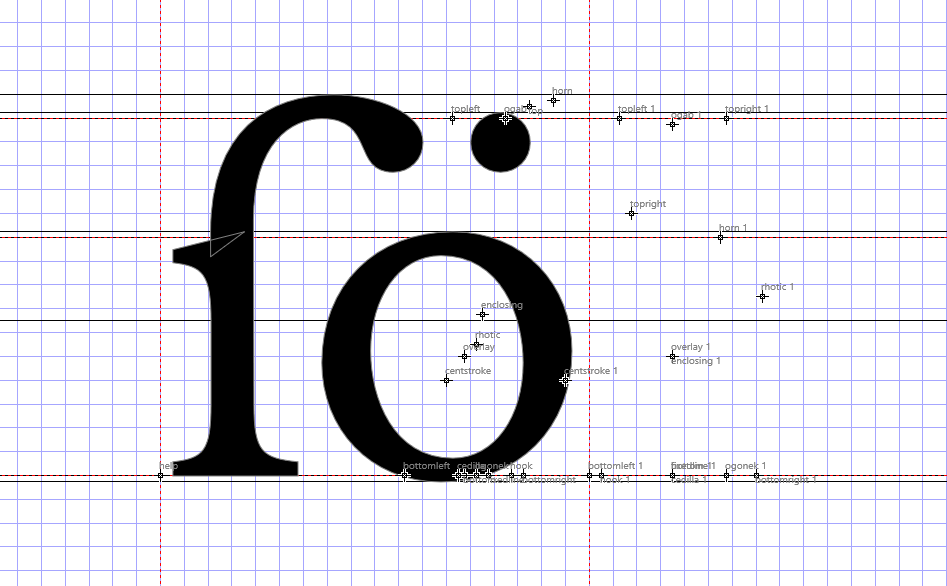
Screen Recording 2026 01 19 172329
You can see that on certain glyphs, moving one anchor doesn’t move it where intended, and also moves the other anchors far away.
File:
Cadexium.fcp (3.4 MB)
Screen Recording 2026 01 19 172329
You can see that on certain glyphs, moving one anchor doesn’t move it where intended, and also moves the other anchors far away.
File:
Cadexium.fcp (3.4 MB)
Also may be worth noting that several glyphs (such as various ligatures in the PUA) have had their anchors moved off to the right somehow, and I will have to tediously manually fix them.
Can you try this unofficial release:
https://www.high-logic.com/tmp/fontcreator/FontCreatorSetup15.0.0.3043.exe
It also seems to fix this issue, but do give it a good test drive:
seems to have worked! thanks!
update it now seems that typing a glyph name in the LSB/RSB/AW in glyph properties no longer works…
Yes, something is still not right. I will upload another update later today which should solve that part as well.
Thanks for reporting this.
Here is another release you can test with:
https://www.high-logic.com/tmp/fontcreator/FontCreatorSetup15.0.0.3044.exe
Also: Cadexium is a really impressive font. Having such a large character set and complex glyph metrics (left/right side-bearings and advance width driven by formulas) is a great stress test for FontCreator.
Let us know your results with this update.
Uhhhh we got more anchor misbehavior
Screen Recording 2026 01 29 191156
I share this mainly because it may have led to those other glyphs’ anchors getting messed up
Also thanks, I’m glad you like the font  <3
<3
We will release another update with a fix soon.
Can you try this release and let me know if that solves all anchor related issues:
https://www.high-logic.com/tmp/fontcreator/FontCreatorSetup15.0.0.3045.exe
looks good! hopefully i wont have to bother you anymore