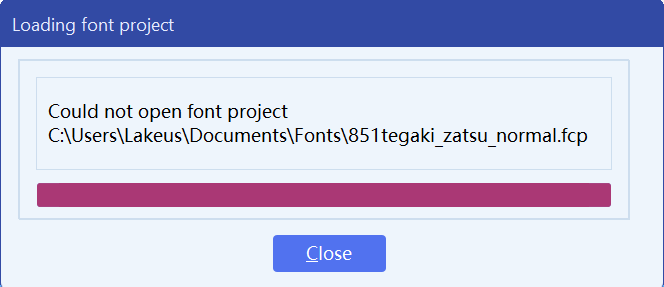
So unfortunately I did not know there is an auto save backup feature and there isn’t any backup files; I peeked through the hex editor and the fcp file seems to not just randomly empty so I wonder maybe if the staff can help fixing the project file? Though it seems like I can’t really upload a file now as the forum says “I’m a new user”. Thanks in advance!
Unfortunately, we downloaded and inspected it, but the project file is corrupt. It does not contain recoverable data, so there is no way for us to restore the project from this file.
I’m sorry we don’t have better news. Hopefully you have made backups over time, in which case the best option is to continue from the most recent working backup.
For future projects, we strongly recommend keeping regular backups, especially before making major changes.
I have turned on auto backup in the settings and unfortunately if that’s the case I will have to recover data from my last export of ttf file which of course loses the tag info and have everything overlapped due to export settings and is actually quite old… Lemme see how I can handle it…
I’m speechless now… I just tried to restart my project and again the whole FontCreator crashed out for no reason, and both bck file and the fcp file is now broken, with the same dialog…
Since you are using FontCreator 15.0.0.3048, we strongly recommend upgrading to FontCreator 16. We recently released it, and it includes many improvements and bug fixes.
We have no other reports of project files becoming corrupt like this, so it could indeed be related to something outside FontCreator, such as disk, memory, cloud sync, antivirus, or another system issue. Still, using the latest version is the best first step.
The problem is indeed present; the same thing happened to me.
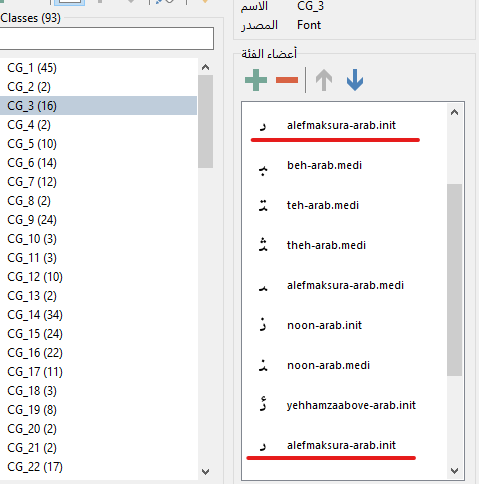
As far as I remember, I deleted a glyph named $FBE8 called uighurkazakhkirghizalefmaksura-arab.init.
I had another glyph named alefmaksura-arab.init, and I added the code $FBE8 to it.
I noticed a duplicate in the OpenType design (see the image).
I copied and pasted the two files and saved the file as “save as,” but both files became corrupted.
I deleted version 3048 and reverted to version 3046. The duplicate name problem exists in 3046,
but the file itself is not corrupted.
I really hope for a stable final release, version 3048, not a stable version.