We create highly dimensionally accurate fonts in Solid edge. Up until recently we would then make solid models and 3D print or 3D engrave them in metal for tracing. Wanting to expand our abilities for customers we now use Aspire 12.5 to engrave logos and type logos with our font. I used High logic font creator and at first struggled due to it not accepting pdfs. So I would export a pdf at 1200 dpi from Solid Edge and use cloud converter to convert it to a PNG. This was close enough approximately to get us by, but I was never happy with how the radiuses especially came out. I figured out how to export in an Inkscape format and that brings in a much more accurate version, but still not great. From there I figured out how to export a DXF and convert it to an SVG. This brought in a glyph that was essentially perfect into Font Creator. The problem I run into now is that when I export the font and try to use that font in Aspire to engrave with the exportation of the font is changing the way the font looks on my radiuses from the way it shows it in Font Creator. I have tried researching posts, google, reddit, tutorial pages and more. I have tried changing every possible setting I can find for the font and exporting of the font. Nothing seems to work. It flattens slightly and changes my corner radiuses. Is this just something I will need to expect or is there some magical group of settings I can change that will make it export exactly what it shows in Font Creator?
FontCreator can import several vector formats directly, including PDF, SVG, and AI. This usually gives much better results than working from a rasterized PNG. If your PDF actually contains vector data, feel free to share a sample and I’ll check why it might not import correctly.
Do keep in mind that a font’s coordinate system only supports integer values, so all point positions are rounded. If you need higher precision for very accurate radiuses, consider increasing the Units per Em (UPM) value of the font, This provides finer detail and helps preserve the shapes more closely during export.
I am able to get a good font in by exporting and converting the file type but Font Creator doesn’t recognize Solid Edge PDF export language so I convert after exporting a DXF instead into inkscape and then bringing it in as either an SVG or Inkscape PDF and that works. Which is fine.
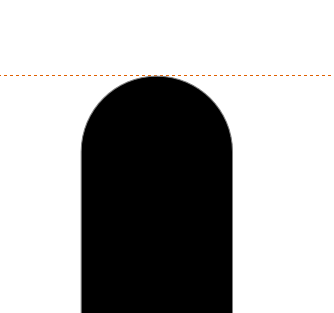
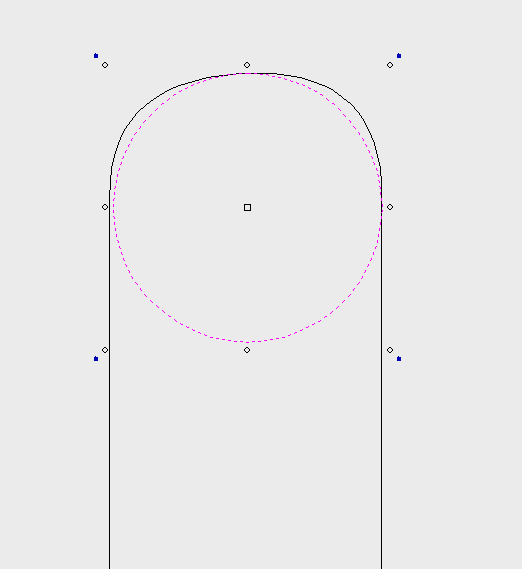
I just raised this value all the way to 10000 and it changed nothing with how the radius exported. It still looks exactly same as before. Below is a picture from Font creator that looks exactly as it should. The secondary pictures with just lines and the circle is what comes into Aspire. It should match the circle which is why I pasted the circle there to compare it to the radius brought in from Font Creator at export. If I’m unable to match it more exactly with font creator that’s fine, but if it’s possible to get it closer; I would like to do that.
I think it has something to do with it converting to Quadratic on export for the TT font desktop format. My thinking is because if I click edit, Convert Contours, Convert to Quadratic it looks exactly the same as it does in Aspire. Is there perhaps a setting I can turn off or change so that it either exports more closely or doesn’t convert my fonts at all in that way? I would guess probably not if it’s part of the TT standards, but maybe someone here knows something I don’t.