Version 3048 often fails to respond when moving glyphs using the keyboard, and it requires exiting and re-entering to restore functionality. Version 3042 does not have this issue.
Let us know how we can reproduce this, and we will look into it.
I, too, have experienced complete shutdowns of FC v.15 when moving glyphs with my cursor keys and the occasional mouse-click. If I am too engrossed with what I amd doing, and forget to save what has gone before, ALL my changes are lost, and I must start over.
I cannnot pin-point exactly what moves and/or combined clicks trigger the ultimate failures, but it becomes an unwelcome nuisance.
Is this on Windows or macOS?
I am using Windows 10.0.19044.7058 LTSC 21H2. My usual operations are double-clicking a glyph to enter outline node editing mode, then using CTRL + arrow keys on the keyboard to move by 1 pixel, as well as entering numerical values plus offsets in the text boxes on the transform panel. The software tends to crash easily, especially when performing consecutive single-pixel movements with the keyboard.
This is something we really want to fix. Are you running FontCreator on Windows or macOS?
Erwin, I am operating with Windows 11. The problem has caused me to change my work-habits, saving my project after every change…
My current project entails the addition of ligatures and variants for the font,
and when completed, I will use that project file as a template for expanding my favorite fonts,… I am hoping that you will find a solution to the indiscriminate crashing of FontCreator. Regards, CF
Hello, again, Erwin! I have encountered another quirky program reactioin…
I have been expanding a font to include ligatures and variants, and was working on the Glyph identified as R.ss02, and I had used the brush-tool so as to add a swash,… I also placed a small orb in the area to combine, but realized that the end of the swash was too close to the WinDecent boundary, so I clicked on the cutting-tool icon, and placed a cut line on the swash, I then changed the mouse cursor to the select-mode and attempted to click on, or surround, the tail-end of the swash. When I did so, the Glyph (R) disappearaed! I clicked on Edit/Undo… and the R re-appeared. Repeating this sequence several times, but with the same result – the R kept disappearing,… Now, the menu item Edit/Indo kept indicating that I had deleted a contour, but I did not ever get to that point.
[CF__My Stunted Roman Ultra.fcp|attachment] Check it out, if you dare!(upload://3QEBm3my2qA9q6j1mo3PdlMD8bG.fcp) (612.5 KB)
Hello, once again, Erwin!
I mis-lead you last, with the callout of the troublesome Glyph. It was really the next one, R.sso3, but I returned to my font project and completed that glyph, and more, successfully. There is, however, another quirky behavior of the FC program (v. 15) that became apparent. When I complete a font project, I usually select File/Print to pbtain a complete record of all Glyphs in the font. This time, however, with 512 Glyphs – the count appeared in the header – not all were displayedl The printout ended with ro.liga, which is #383 within the font. Luckily for me, the installed version of the font, does display all gluphs as “Special Characters” with my WP-software. Just thought that you should be aware of this, also.
We will further look into this issue.
Some exciting news, finally: next week I will release FontCreator 16, and I already have a beta available here:
<download latest version from the official download page>
I would really appreciate it if you could give it a try and let me know if it improves stability in your workflow.
A summary of improvements and new features in the upcoming major release:
- Better point selection and point-hover highlighting
- Any contour or component can now be flagged as a Mask, subtracting from the geometry that precedes it — a first-class alternative to overlap removal for non-destructive design
- Added smart components, with full per-master smart layers
- Detection and fixing of possible kinks between masters
- Import/export of selected glyph outlines to SVG
- Export as CFF2
- Option to export a single font filename with or without the style name
- Improved merge contours
- Redesigned Masters and Layers panel with full support for background layers, helper layers, color layers, reference artwork, and smart layers
- Anchor panel no longer crashes during rapid font/panel switching
I hope this upcoming release will solve the issues you are seeing.
I was unable to download the version; the browser gives a message saying it could not be downloaded safely.
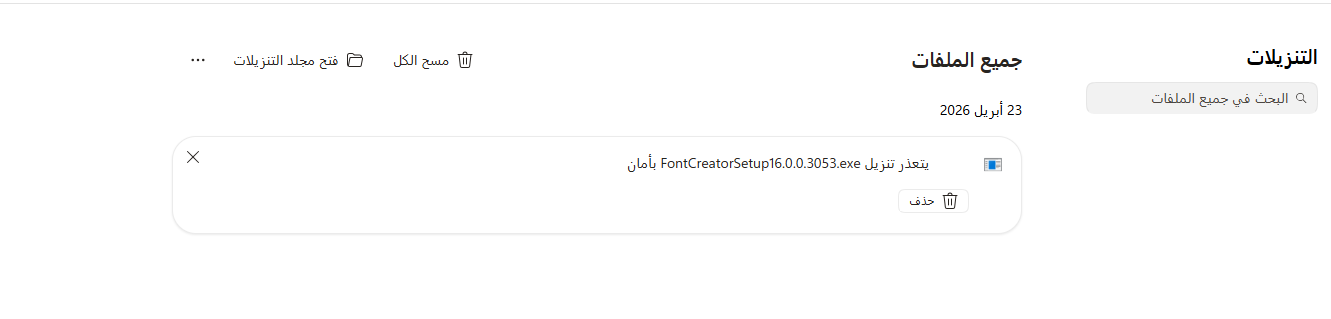
I have fixed the url.
Do try again.
After installing the program, it won’t boot. I think the language issue persists.
Try this release:
<download latest version from the official download page>
Did version 16 solve the issue?
The issue mentioned above doesn’t happen frequently anymore, but occasionally the layer being edited still gets locked. When that happens, you just need to check if the lock status on the right side of the layer is activated. I’m still looking into what’s triggering this.