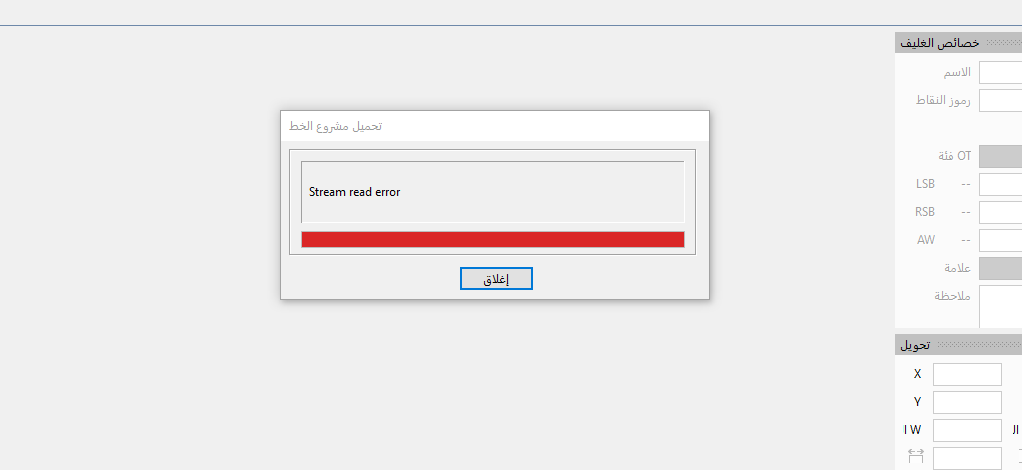
Due to several new features in FontCreator 16, the Font Project file format is no longer backwards compatible. This means projects saved with FontCreator 16 cannot be opened with FontCreator 15.
However, FontCreator 15 should have shown a clear message explaining that the project was created with a newer version of FontCreator. The “Stream Read Error” message is not helpful, so we will look into improving that.
For now, please keep a separate backup of any projects you want to continue opening in FontCreator 15, and only save copies in FontCreator 16 while testing the beta.
I have just dowladed and installed FCv.16 for a trial… I was very pleased that I could change to a dark theme, which enaabled and easy view of all boundaries! I was NOT pleased todiscover that my desktop links to FCv.15 have been eradicated!!! For your final release, you must enable the user to determine the location of the program file(s), so as not to render all previous work as useless!!! Luckily, I have the necessary installation files to bring back my FCv.15, but… will doing so write over the FCv.16 installation? Please describe how to recover after the trial ends!!! For some, this could prove to be disasterous!!!
You opening notice for FCv.16 includes a notice of a printable manual being available, via a link. Bogus!!! The link brings one to the FCv.15 manual. Just how far into the future will you be extending the release of FCv.16???
FYI: I deleted FCv.16 from my Programs, and attempted to re-install FCv.15, but after locating the icon on my desktop and clicking on it, I was astounded to see the opening notice (again!!!) for FCv.16. So, I have re-installed the old version, after setting new folder names.locations. Now, I have a separate location for my FCv.15 programming. My next stunt will be to try to re-install FCv.16 with the Setup file that was downloaded. Stay tuna’d!!!
Thank you for testing the beta, and sorry for the confusion and concern this caused.
We will improve the installer so this won’t ahppen again.
If you want to go back to FontCreator 15 after testing version 16, you can uninstall FontCreator 16 and then reinstall FontCreator 15 using your existing installer and registration code. Do keep in mind that FontCreator 16 uses an updated project format, so projects saved with version 16 may not open in FontCreator 15. For that reason, it is always best to keep backups of projects before saving them with a newer major version.
Reinstalling FontCreator 15 should restore the version 15 shortcut. If the installer asks to uninstall or replace the existing version, please follow that process. It will not remove your font files or projects.
About the manual: you are right, the link currently still points to the FontCreator 15 manual. The FontCreator 16 manual will be made available with the official release, which is planned in two days. The link will be corrected by then.
Thanks again for reporting this. We will review the installer behavior and the wording around this, as it should be clearer for people who want to test the new version while still relying on their current production version.
Thanks for your attention to my concerns, Erwin. I do have one final one. It appears that my discovery of the Dark Mode was rather late… it does also exist in FCv.15. My only remaining comment is that, while I do find workin in the Dark Mode or Theme is helpful for my eyes, it also obscures the individual icons and text within the Menu Bar. Could it be arranged that the Menu Bar area of the window is not quite as dark as the working area for the glyphs? That, too, would be much appreciated!
Thank you for the feedback. You are right that dark mode was already available in FontCreator 15.
Interestingly, the Menu Bar area used to be a lot darker, so we already made it lighter in more recent builds. That said, I understand your point: if the contrast still makes some icons or menu text harder to distinguish, there is room for further improvement.
I have added this to our to-do list, so we can review whether the Menu Bar and toolbar area can be made a bit clearer while still keeping the overall dark theme comfortable for glyph editing.
Erwin!!! I have two more “final comments”!!!
(1.) This must be day three of my 6 day trial of FCv,16, but while putting some finishing touches on a current font project, I received a notice, surrepticiously appearing at the lower right of my screen, telling me that my trial is over!!! (2.) I think I have finished with my current project on FCv,16, but when I check on the Lorem Ipsem, or Any Zanily, I see that the ketter combo k-e continues to be squeezed together, no matter how much I try to move the side boundaries. What is still wrong with the font? After completing all the glyphs, I used Autometrics to establish “0” on the left, and “20” on the right, for “ALL,” and then corrected for the space and some other glyphs (like the capital Q), but the k and the e still are smooshed into one anotheer!!! I would like to submit the project file for examination… Ultra 1354 Styvesant.fcp (740.3 KB)
I checked your trial, and from what I can see it should end on 2026-05-04 at 16:10:59, so I do not understand why you received a message saying the trial is over.
Could you please post a screenshot of that message if it appears again? Also, please check Help > About in FontCreator and let me know what it shows there regarding the trial/license status.
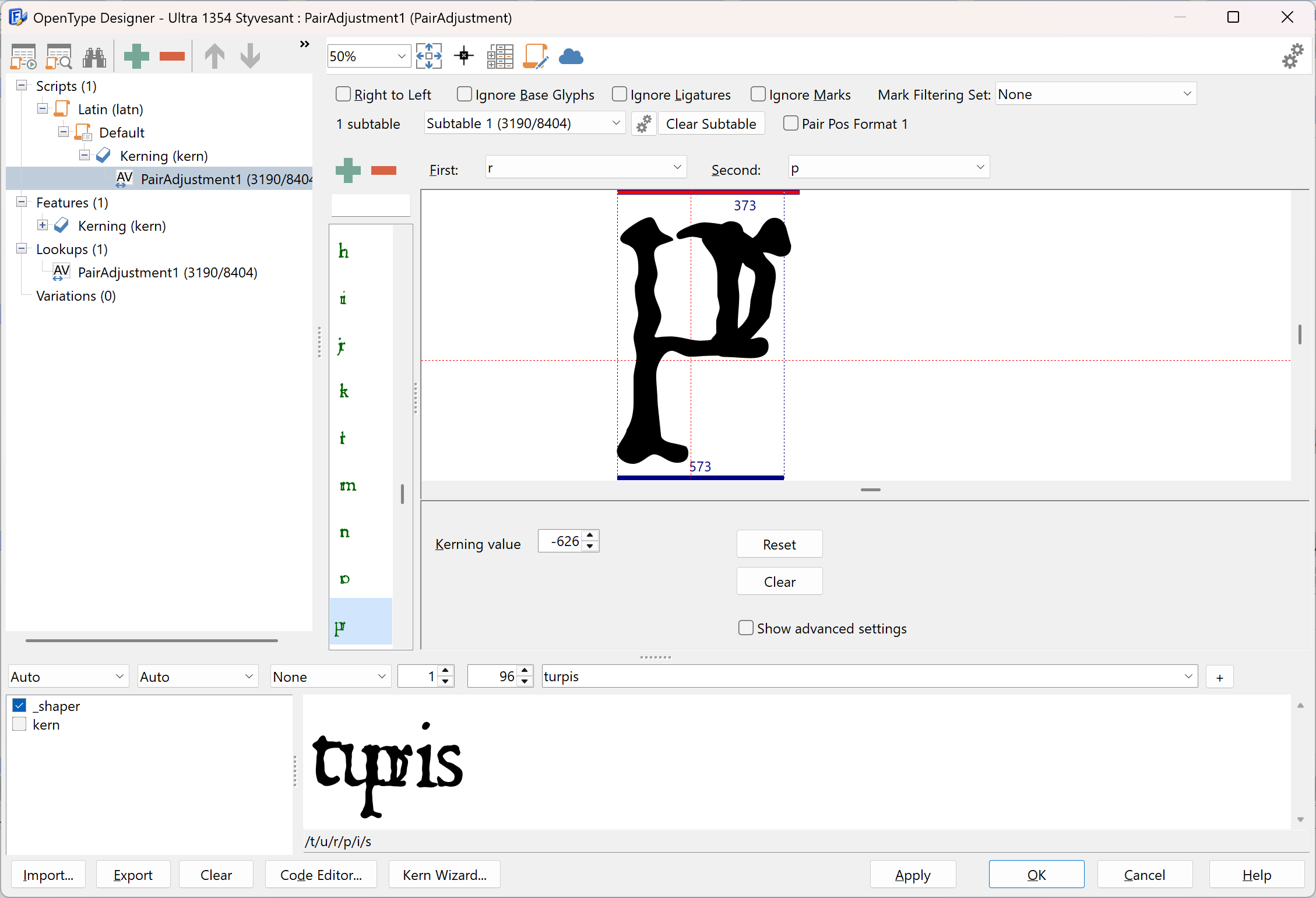
As for the spacing issue: I looked at the font, and it does contain kerning. Several kerning pairs have values that are far out of range. For example, the pair rp has a kerning value of -626, which moves the p almost on top of the r. That explains why some combinations look “smooshed” even if the left and right side bearings look fine.
So the issue is not the side bearings set by Autometrics, but the kerning data. You can inspect and correct this through the OpenType Designer, under the kerning feature/lookups. You may want to remove the problematic kerning pairs or regenerate the kerning if needed.
Erwin, in addition to the k-e phenomenon, I just noticed that the same is true for the combo r-i…
Then, the actions that I took next seemed to have caused the FCv.16 program to freeze - up!!! I wanted to create a variant of the submitted font, and chose to use the GlyphTransfomer/Effects/Thin, and chose the settings 10 vertical, and 30 horizontal. The program eventually crashed, and when I started it again, I was still able to look at the same project file (no changes). I repeated my attempt, this time choosing the settings 5 vertical and 22 horizontal. Eventually, the program settled down, and I was able to view individual glyphs and proceed… Just so you are aware!!!
I have gone back to FCv.15 because the beta-release of FCv.16 proved (to me) to be unstable,… I refer you tmy experience(s) with the submitted project file. At least, when I open up the font that I had generated, with my re-installed version 15, I do not see the slowness to respond nor the prevailence to fail unexpectedly.
Your kerning-discovery has me still baffled, because I did NOT attempt to adjust any kerning in athat font. However, I have yet another “problem” since deleting FCv.16 and going back to FCv.15: When I click on Help/Check for Updates, I am shown that an update is available, and a download button provides the link. I download the “Setup-File” and click on it. When it is finished, and FC opens, it appears to be the trial version of FCv.16. I have done this three times, and each time I have re-labeled the set-up file, and each time it opens the trial version, and not the FCv.15. Tell me, please, is the upgrade to FCv.15 now to be FCv.16, only because you chose to release it??? Is there a REAL update to FCv.15, or not??? Thanks for a coherent response, Erwin! --regards, Säge Späne