FontCreator Version: 16.0.0.3080 (64-bit)
Operating System: Windows 11
Font: Naskh Lahori Lite
Script: Arabic
OpenType Feature: mkmk — Mark-to-Mark Positioning
Bug Description
I have found a rendering inconsistency in FontCreator 16.0.0.3080 (64-bit) involving Arabic mark positioning.
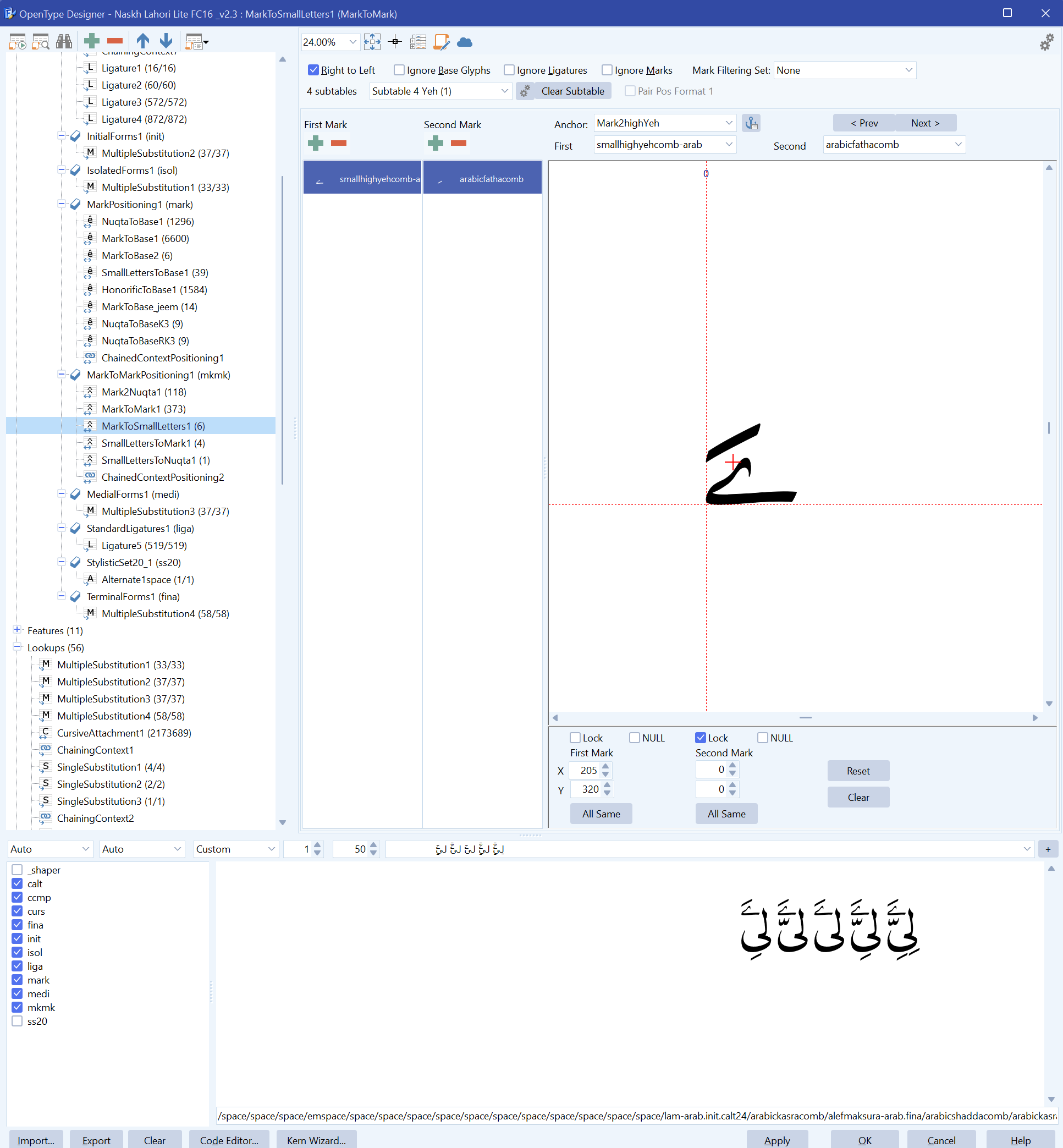
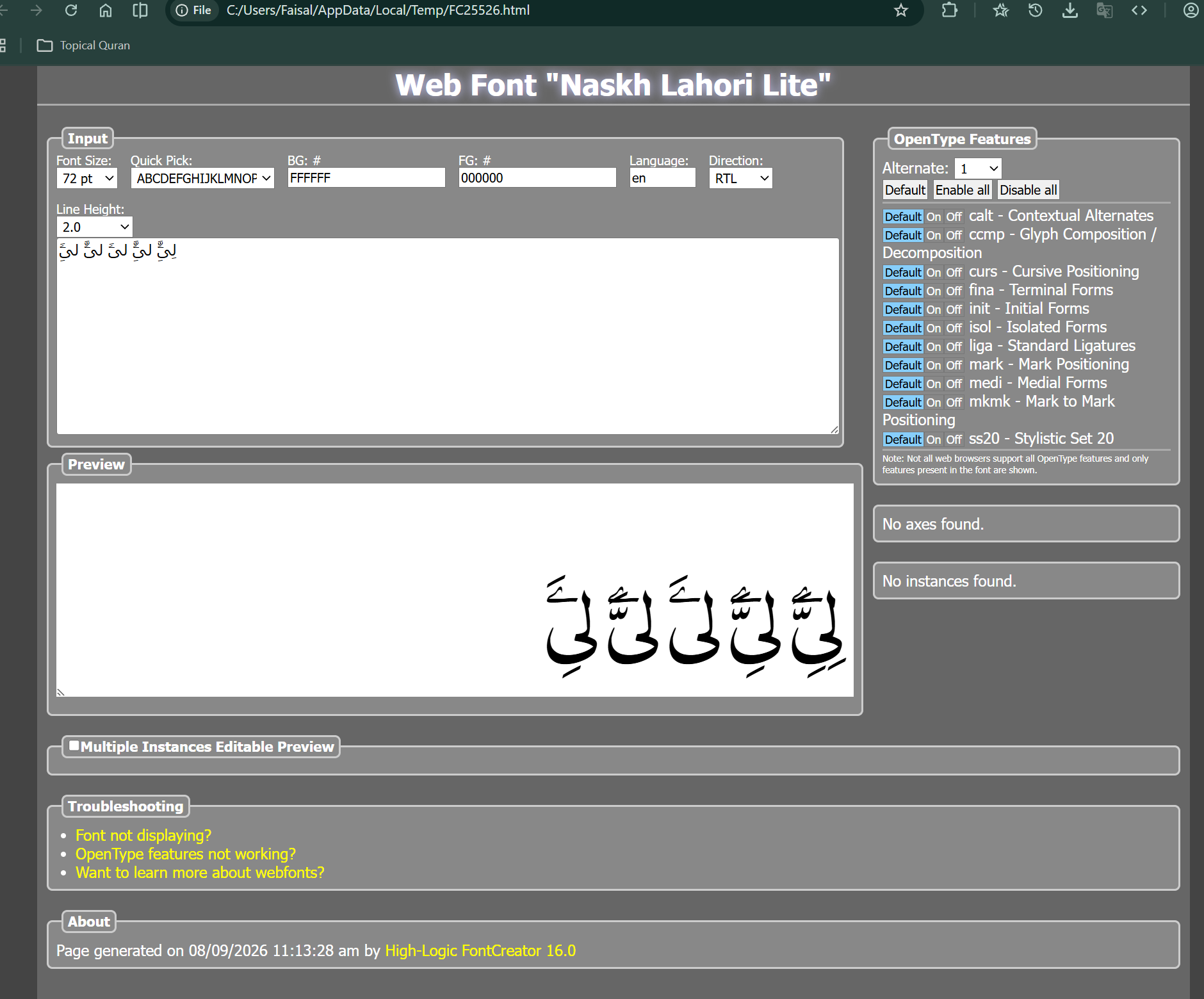
The OpenType Designer proofing preview displays the Arabic marks correctly. However, when the same font and the same test text are viewed in FontCreator’s Web Font Preview, the mark positioning is different and visually incorrect.
The same incorrect positioning shown in the Web Font Preview is also reproduced in Adobe InDesign 2026.
In other words:
| Environment | Result |
|---|---|
| FontCreator OpenType Designer proofing preview | Correct mark positioning |
| FontCreator Web Font Preview | Incorrect/different mark positioning |
| Adobe InDesign 2026 | Same incorrect/different positioning as Web Preview |
The two attached screenshots demonstrate this difference.
Relevant OpenType Configuration
The affected positioning is related to the mkmk feature.
In OpenType Designer, the relevant lookup is:
- Feature:
mkmk - Lookup:
MarkToSmallLetters1 - First Mark:
smallhighyehcomb-arab - Second Mark:
arabicfathacomb - Anchor:
Mark2highYeh
The OpenType Designer proofing area shows the expected positioning for this combination.
However, the Web Font Preview and Adobe InDesign 2026 produce a different result.
Steps to Reproduce
- Open FontCreator 16.0.0.3080 (64-bit) on Windows 11.
- Open an Arabic font containing the relevant
mkmkpositioning. - Open OpenType Designer.
- Open the
mkmklookup containing the relevant mark-to-mark positioning. - Test the affected Arabic sequence in the OpenType Designer proofing area.
- Observe the mark positioning.
- Generate/open the Web Font Preview for the same font.
- Enter the same test sequence.
- Compare the Web Font Preview with the OpenType Designer preview.
- Test the same font/text in Adobe InDesign 2026.
- The Web Font Preview and InDesign produce the same incorrect/different mark positioning, while the OpenType Designer preview produces the expected result.
Expected Behavior
The OpenType Designer proofing preview should accurately represent how the exported font will behave in normal external applications.
At minimum, if the OpenType Designer uses a different shaping or positioning engine from the Web Font Preview, the difference should be clearly understood and documented.
For font development, particularly with complex Arabic typography, the proofing environment needs to provide a reliable indication of the actual behavior of the exported font.
Actual Behavior
The OpenType Designer preview indicates that the mark positioning is correct.
However, the Web Font Preview renders the marks differently, with incorrect positioning.
Adobe InDesign 2026 reproduces the same incorrect positioning seen in the Web Font Preview.
This makes the internal proofing result potentially misleading during OpenType development.
Why This Is Important
This discrepancy can cause a font developer to believe that an OpenType positioning rule is functioning correctly because it appears correct inside FontCreator, while the exported font subsequently produces a different result in actual applications.
This is particularly significant for Arabic fonts because correct rendering can depend on the interaction between:
markmkmk- anchor positioning
- mark classes
- GDEF glyph classifications
- contextual substitutions
- Arabic shaping and positioning
Therefore, consistency between the FontCreator proofing environment and real-world rendering engines is important.
Questions for the Development Team
Could you please clarify the following:
-
Does FontCreator’s OpenType Designer proofing preview use the same shaping/layout engine or processing path as the Web Font Preview?
-
If they use different engines or processing paths, what are the relevant differences, particularly for Arabic
mark/mkmkpositioning? -
Is it expected that the OpenType Designer preview can show correct
mkmkpositioning while the exported font produces different positioning in external applications? -
Is there a FontCreator setting that allows the OpenType Designer proofing preview to use the same or equivalent shaping behavior as the Web Font Preview?
-
In the proofing window there is an option named
_shaper. Is this option related to the shaping engine used by the preview? If so, what exactly does enabling or disabling it change? -
Could this discrepancy indicate a problem in the OpenType Designer’s internal proofing/shaping implementation rather than an issue with the font’s OpenType data?
-
Would it be possible to make the OpenType Designer proofing result more closely match the behavior of the exported font in standard external applications?
Attachments
I have attached two screenshots demonstrating the issue:
proofing_tool.png— FontCreator 16.0 OpenType Designer proofing preview showing the expected mark positioning.webview.png— FontCreator Web Font Preview showing the incorrect/different mark positioning.
The same incorrect positioning shown in the Web Font Preview is also reproduced in Adobe InDesign 2026.
I am not providing my .fcp project file or exported .otf/.ttf font files with this initial report. If the development team requires additional files or a minimal reproduction case to investigate the issue, I can provide them upon request.
Summary
The issue can be summarized as follows:
The same Arabic
mkmkpositioning appears correct in FontCreator’s OpenType Designer proofing preview but renders differently and incorrectly in FontCreator’s Web Font Preview and Adobe InDesign 2026.
I would appreciate clarification on whether this is an expected difference between FontCreator’s internal proofing engine and external shaping/layout engines, or whether the OpenType Designer proofing preview should be considered inconsistent with the actual behavior of the exported font.