Hello! I am Vivi from the UK. Writer and designer by profession. Have always been fascinated by typography. As a child, would stare at fonts for hours on end. But never got to learn type design. Have finally taken the plunge. I know how to use vector software quite thoroughly. My main power tools are PhotoLine and Xara Designer Pro. Both are incredibly good at drawing cubic beziers. I also know how to draw the glyphs themselves by hand. My idols are Stanley Hess and Fredric Goudy. Goudy because of how prolific he was despite being self taught. Hess because I know of no other person who took such a holistic approach to defining the proportions of Latin face. Hess was talking about variable fonts in 70s. That’s me in a nutshell.
I am designing fonts for Tamil, with Latin support. Could someone please point me in direction of some tutorials for FontCreator? I’d be very grateful. I found only voiceless videos which I had trouble following. I’m autistic too, so that doesn’t help. Thank you!
@ErwinDenissen : I also noticed that that website doesn’t open on desktop. I have to use the phone. Am I missing something?
Hi, Vivek. Welcome to the forum. I created the tutorials without voice-over because it takes me less time time. John Haven added voice-over for three videos, such as Getting Started with Fontcreator 11. For learning the basics, it doesn’t matter that the videos were made years ago. Not much has changed for the basic skills of drawing contours in FontCreator.
Importing SVG images or PDF files from your favourite drawing application may be better for you, but I prefer to use the built in tools to create outlines.
My Free OpenType fonts include a lot of characters for Latin Extended characters, which are used for Pāḷi and Vietnamese, plus a wide range of symbols.
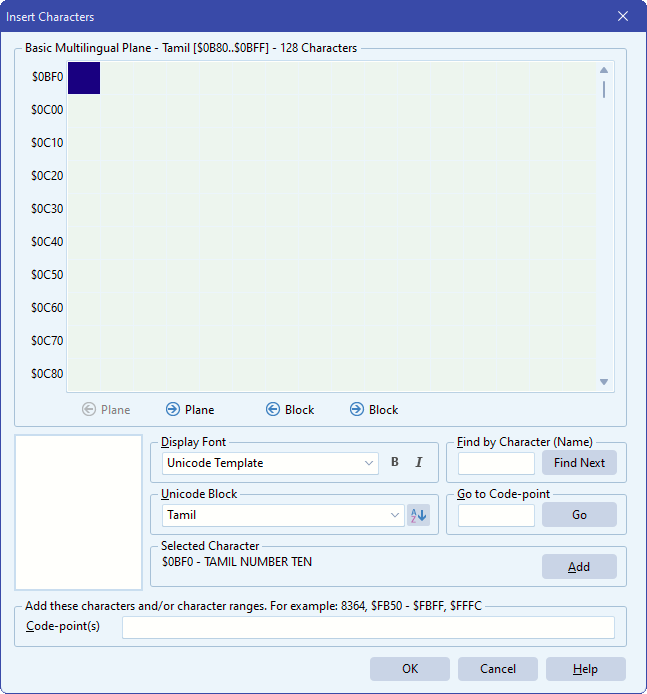
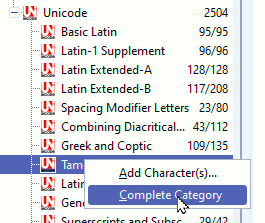
Familarise yourself with the side panel in FontCreator for adding the Unicode blocks required for Tamil.
We’ve seen this with several other users: their desktop couldn’t open our website because something on the PC was blocking high-logic.com. In a number of cases that turned out to be caused by unofficial/cracked “repacked” installers, which sometimes modify the hosts/DNS settings to block our domain (to prevent updates/licensing).
If our site opens on your phone but not on your desktop, please check your hosts file and make sure you’re using the official installer from our website.
Thank you so much. This is extremely useful. I’ll be coming back with more questions. But for starters, is it possible to do open corners in FC? Thank you again for the response
https://youtu.be/bsT9RX5MpRA?t=1664 - This video explains it better than I could. Open corner allows you to essentially move the corner without losing curvature. It’s better seen than read.