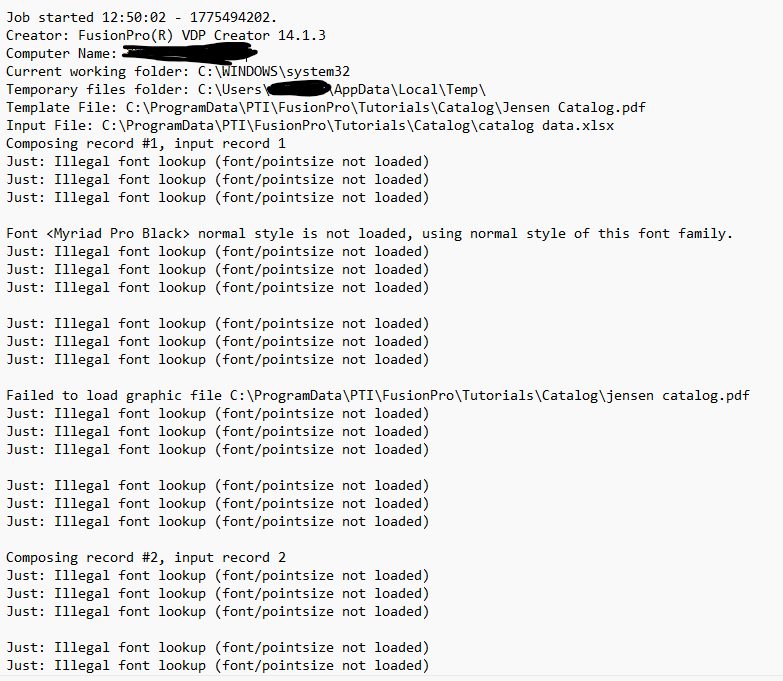
My Graphics department uses Windows 11 and PTI FusionPro VDP Creator to create Variable Data jobs. Over the past 15+ years we’ve used Extensis Suitcase and now Extensis Connect fonts. We don’t have any issues. I have since purchased 25+ licenses for High-Logic MainType for part of the graphics department.
I love MainType!!!
The issue is that the PTI FusionPro VDP Creator no longer works correctly. The associates that use the PTI software are stuck with the Extensis software.
I reached out the the engineers at PTI and we ran though various simulations to no avail. They actually had the CEO that created the software involved came to the conclusion that it is the font manager causing the issue and all the logs show that FusionPro is working the way it should. They believe that problem is how MainType manages the fonts within Windows.
Thanks for the detailed report, and I’m glad to hear you like MainType.
Based on your findings, this does appear to be a compatibility issue between FusionPro and the way fonts are made available to Windows on those specific workstations. Since everything works again after switching back to Extensis, the issue is likely not with the fonts themselves, but with the interaction between FusionPro and the font activation method.
I am not aware of other reports about this specific combination, but I do take your findings seriously.
As a next step, I recommend a controlled comparison on one affected system using:
• the same FusionPro job
• the same font files
• once with Extensis
• once with MainType
• once with the fonts installed directly in Windows without either font manager running
If the direct Windows install works, then that would strongly suggest the issue is related to the activation or visibility layer, rather than the font data itself.
If you can share the exact MainType version, FusionPro version, whether the fonts are temporarily activated or fully installed, and what exactly goes wrong inside FusionPro, I’ll be happy to look into it further.