You added two contextual lookups, while you need only one. Do take a look at the two screenshots in my previous post, and let us know your results.
I think I did it! See attached! 
Is it all “correct” now? The script compiles okay.
I’m still not sure if I did that @latn_letters class right though – I added in basically “everything,” virtually all my glyphs, not just “letters” but punctuation, numbers, symbols and everything, including the a.ender glyph, too. At least, that was the context in which I would think one would NOT want that ender character to show up – although maybe I should delete all the punctuation and symbols???
I suppose that’s basically up to me, what contexts I’d want these alts to show up under?
Thank you SO much for your help, Erwin! Hope I did get it all done correctly now, if you don’t mind confirming that for me – I’ll attach this latest, seemingly-working-correctly version again here.
EDIT: I’ve been plugging away here, adding in additional “ender” glyphs, and everything seems to be working fine! Lots of tedious (but fun!) work ahead of me now – coffee pot is on! 
Walden.ttf (582 KB)
Excellent, keep up the good work!
Well, I’m just thrilled with how this is turning out! Getting these “enders” done (and I still have some more to do) has really made all the difference in getting my font looking that much closer to Thoreau’s actual handwriting! Of course, I’ll never be able to do that “perfectly,” because his handwriting was about as imperfect and inconsistent as you can get, but here, I’ve re-done those handwriting/font comparisons that I included in my initial post in this thread…
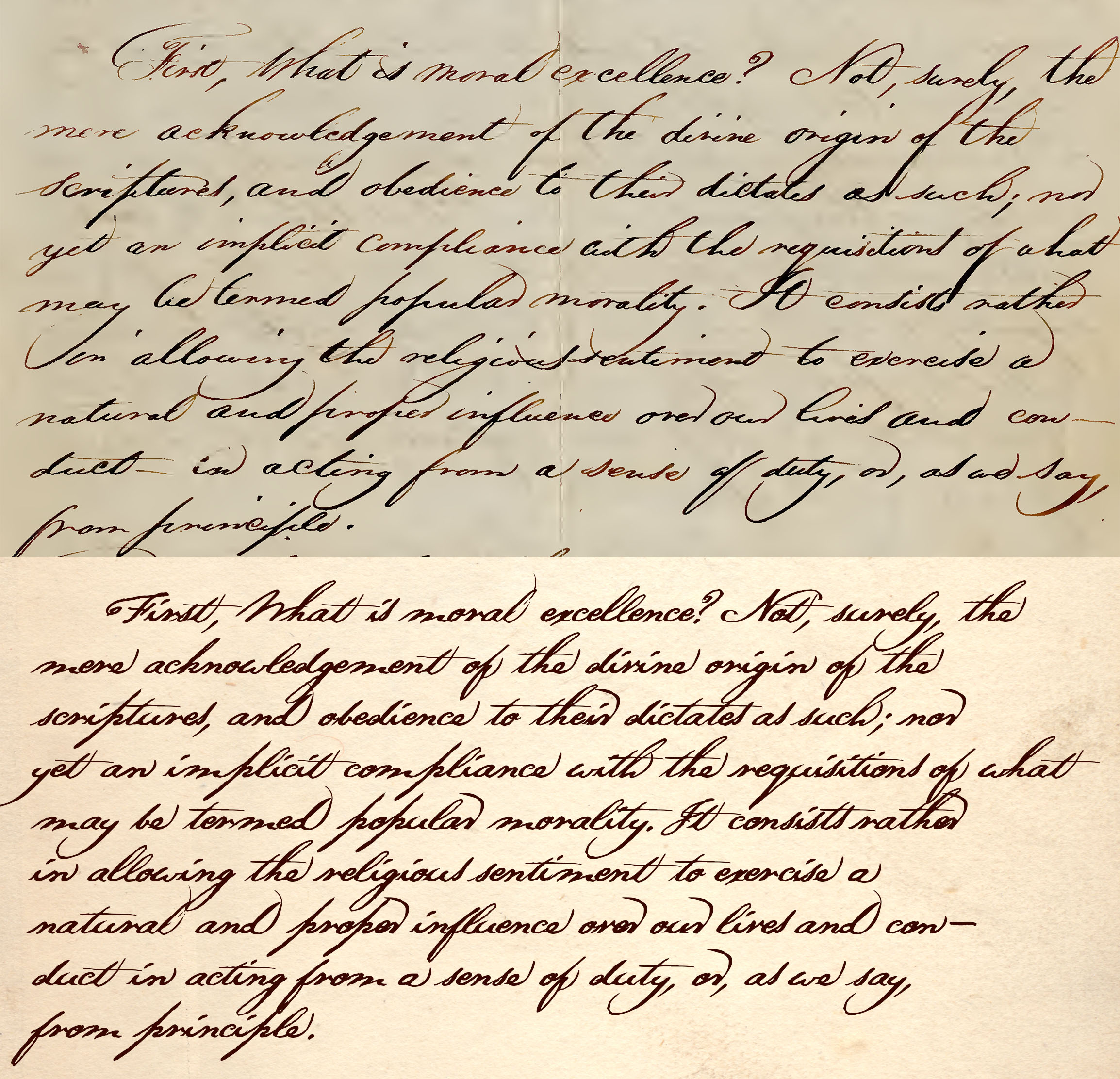
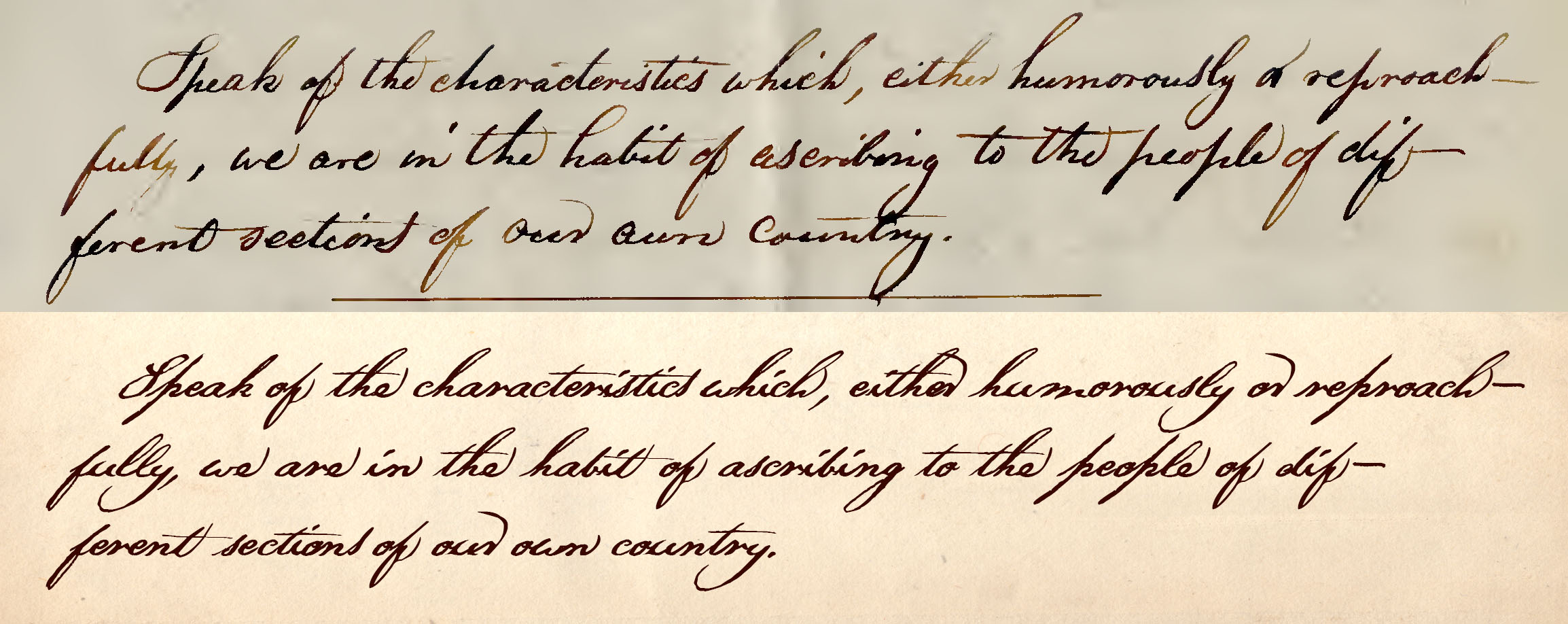
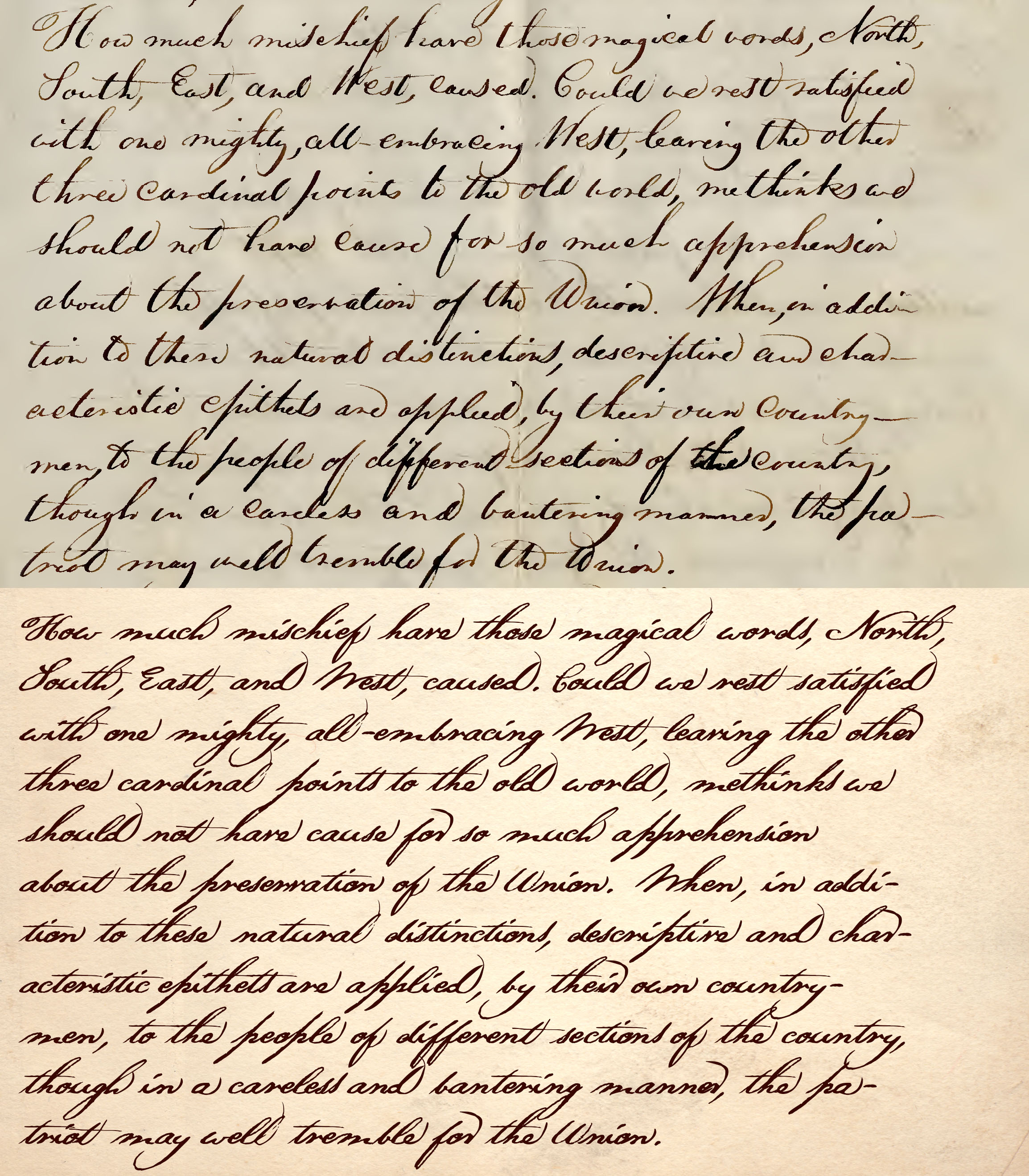
As I said above, I still have some more enders to do, but now I’d also like to add in some “beginners” (or “starters,” or whatever the word is – is there a word letters that start a word???) – at least, there’s one at the moment I’d like to do, a bigger lowercase “s” for when it’s at the beginning of a word, just as I created a bigger “ender” of that character, too. I’ve noticed that Thoreau often did his “s” bigger not just at the end of words, but also at the start, too – and I think I could probably get away with using the same glyph for both?
But in any case, I don’t know how to create that additional substitution – could I trouble you to explain that for me?
I guess that’s the thing about what I did so far with this first foray of mine in contextual alts – I followed your instructions ‘n’ stuff, Erwin, but when I’m in that “Chaining Context” dialog box (especially) I don’t quite understand what’s going on in there, all I was doing was following instructions.
Let me guess here… If I want to do alts for letters at the beginning of the word, would I put my @LATIN class (what you had named @latn_letters) in the Input field, but then instead of also putting it in the Lookahead field, I instead put it in the Backtrack one (leaving Lookahead empty, of course)?
I haven’t got a clue what the Substitution Tables field might be for – but if that’s something way more advanced than my needs right now, then never mind. 
I think I had another, separate question, but now I can’t remember what it was (still waking up and starting my day). In the meantime, though, just to reiterate the links in my first post, if anyone wants to try out my font in its latest incarnation, you can do so here…
And, the latest version of the font (updated regularly, as I’m working on it) can be gotten here…
As I said at the beginning of this reply, I’m just giddy with delight over how this is all turning out! Thank you so much, once again, for all your help, Erwin. 
I can’t find any info anywhere for how to do this stuff – I can’t even find a definition of “Backtrack.” Searching the forums yields no results (apart from this thread, here) and there’s nothing in the FC help about it, either.
Where does one go to learn how to do this stuff? I’m not saying that to be critical, rest assured, I’m genuinely asking quite sincerely – where does any aspiring type designer go to learn how to use these sorts of features in this program?
This stuff is like programming, and FontCreator is a software that allows users to do OpenType programming. The help documentation should tell us how to use the program, not how to do programming.
There are many possible ways to program OpenType features. There is a description of features such as Contextual Ligatures on the Microsoft website.
FontCreator is pretty smart. It will add a number of standard features automatically, and automatically generate kerning pair classes. However, I prefer to create my own kerning pair classes. It is more work, and I may make mistakes that I need to debug, but it gives me more control.
I learnt some stuff by opening professional fonts and looking at the code, and other stuff by trial and error, or by reading the forum and asking questions. I learnt some things from the TypeDrawers Forum, where there are several professional type designers who use other software like Fontographer.
But that’s the problem – the help documentation doesn’t tell us how to use the program. There isn’t even basic definition for things – like, when I’m in that Chaining Context dialog box, if I click on the “Help” button that you see in there, then one might expect to just get at least a simple definition of what you’re seeing on that page – Backtrack, Input, Lookahead, etc. – but there’s nothing, not even a definition of what those terms mean, let alone any help in how to use make use of that feature.
There are many possible ways to program OpenType features. There is a description of features such as > Contextual Ligatures > on the Microsoft website.
Very little info there.
FontCreator is pretty smart. It will add a number of standard features automatically, and automatically generate kerning pair classes. However, I prefer to create my own kerning pair classes. It is more work, and I may make mistakes that I need to debug, but it gives me more control.
Yes, I learned that much fairly quickly, too, that it’s much better to do your own classes/kerning, rather than autokerning. It’s a nice feature to have, though, if for some reason you just wanted to whiz off a font super-fast or something, and didn’t care much about how “perfect” the kerning was.
I learnt some stuff by opening professional fonts and looking at the code, and other stuff by trial and error, or by reading the forum and asking questions. I learnt some things from the > TypeDrawers Forum> , where there are several professional type designers who use other software like Fontographer.
I started on Fog (as it was affectionately called back when it was “the” font software to get – before FC) and all the hair-pulling I went through with learning that gave me a good head start when I first got FC, as there’s much that was quite similar.
I’ve learned SO much since then, though – learning how to do ligatures (so simple now!) and now these contextual alts is way ahead of where I was back with Fog, but I learned it all basically via this forum, by asking “How do you do this?” and not via the help files.
Also, from Erwin…
Well, that page is interesting (for me, since I’m trying to learn about this stuff), but at the same time a bit confusing, or not quite clear.
Like, the first paragraph there says: “There are two Chained Context lookups, one for positioning and the other for substitutions. They will perform the substitution tables if a match is found for the combination of backtrack, input, and lookahead.”
Even as I’m trying to learn this, and don’t quite have a grasp of this yet, I know that’s not entirely accurate – because the substitution that I did already, for those “ender” glyphs, didn’t make use of “the combination of backtrack, input, and lookahead,” but only input and lookahead.
In any case, I suppose if I just give up (for the time being) on the idea of actually “understanding” what I’m doing, and what the definition of each and every word might mean, what I really want to know is simply how to do what I want to do.
And so back to my question-of-the-day (or yesterday), I’ve now got “ender” glyphs showing up nicely, and know how to add in more – but I can’t figure out how to go about adding in a second, separate thing to do my “beginner” letters ((or “starter” letters – is there another word for the first letter of a word???). I tried various things last night, like just adding in a second Chaining Context, but when I do that it seems I can’t add in my @LATIN class (with all my latin characters) because, I’m assuming, I used it already in the other Chaining Context.
Or I don’t know what the heck is happening, because I have no idea what I’m doing.
So I guess that’s basically my question. I’ve done my “enders,” those are all going fine, but how do I add in an additional one for my “beginners” (or whatever)?
Did you take another look at the link I provided in my first reply?
I did take a look, read the whole thing – but I gather I should go back for another look, I must’ve missed something (or forgotten what was there).
I’m just waking up now (at 2:30pm) – I’ve been pulling all-nighters at this! Got a few things to do, but I’ll indeed take another look there and get back to you.
Okay! Never mind my last reply – I got it! And once I got it, I couldn’t believe how dumb I’ve been, how much head-scratching and hair-pulling I went through, when the solution seems so simple to me now. 
With that said, though, I noticed in that other thread that the guy had a “ChainingContextBetween” one – is that for swapping letters in the middle of words, I gather?
I was wondering about that, actually. I have my lowercase “t,” with a rather long crossbar, but it intersects with where the dot is on the “i.”
Can I set up a substitution so that if an “i” is adjacent – on either side – of a “t” then it gets swapped out for an “i” with the dot up a bit higher?
I know how to do substitutions for first and last letters in a word now, but I don’t know how to do something in the middle of a word like that.
(If perchance you want to download/try out the latest version of my font, you can do so via the links in my first/original post here. I’ve got a bunch of “ender” glyphs now, but for “beginner” glyphs I only have an “s” and “w” so far.)
Yes, that would be a great idea! But yes, that would be a great deal more work, too. I could easily come up with tons of variations for practically every letter (except some that only came up very rarely in Thoreau’s manuscripts, like x, z, etc.), but I suppose to do so you have to also make sure that each one kerns the same as all the others, even if they “look different,” eh?
Definitely an interesting though – although a little too ambitious for me right now. Maybe some day, for “version 2” of my font.
Do you know how to do this stuff, PJ, though? Like, do you know how to do my last/latest question, swapping out a different lowercase “i” whenever it’s on either side of a “t”?
I bet! You must be relieved to have me not repeatedly pestering you to explain what seems so ridiculously obvious to me now.
To make a contextual substitution in the middle of a word, just add a backtrack, input, and a lookahead.
Well, that much I figured, but I’m having trouble trying to “logically think through” what exactly I would put in each of those fields. I gather I wouldn’t be using that @LATIN class that I have (which contains all latin glyphs), but what do I put instead?
Like, in this case I want to swap out an “i” (to one with the dot up higher) if it’s on either side of a “t,” so I guess my “input” would be the “t” (alone) and then both backtrack and lookahead would both be an “i”?
But with the other substitutions I did it was that “input” glyph that I swapped out, not the backtrack or lookahead.
And wouldn’t that mean that I’m also only looking for combinations of “iti,” not just “it” or “ti”? So do I create two different, separate chaining contexts for each, i.e. one for “it” and one for “ti”?
I guess I can just play with it, experiment and “see what happens” – if you have a quick answer for me, though, that would be great!
And thanks once again, SO much, for your help!
If anyone has any other ideas for what sorts of things I could do with this font to make it even better (apart from PJ’s suggestion to do piles of “random” glyphs – which would be very cool, but an enormous amount of work), please do fire away!
Remember the substitution only applies to the input.
Oh, okay. So I guess I would indeed have to create two separate chaining contexts?
Ugh, it’s trying to logically think my way through this that makes my head explode.
I’m confused here because doing those beginners/enders – is the “correct” term for those “initials” and “finials”??? – was fairly straightforward. For my input, backtrack and lookahead fields (in two separate chaining contexts) I simply put that @LATIN class, and then in the single substitution I put specific letters that would get swapped out.
But this situation is different. I want to swap out an “i” for a different “i” whenever it’s to the left of a “t” – and then I guess I also have to create a separate chaining context for if/when it’s to the right of a “t” – but I can’t seem to logically think what to put in those various fields now.
I’m not sure if I understand what I’m supposed to do here. While my previous chaining contexts were “all latin characters” (as per my @LATIN class), in this case am I creating a chaining context only for “i”? And I need one chaining context for “i” to the left of a “t,” and then a separate chaining context for if I have an “i” to the right of a “t”?
So beginner and enders you can do with a single chaining context, but to do it for letters in the middle of a world requires multiple chaining contexts?
Somehow I don’t think that can be right – but I can’t seem to logically think through something to even try out as an experiment. 
I keep forgetting that you have to think backwards, in a way, in that chaining context dialog box – like, if I want to do substitutions related to “iti,” then in that dialog box you have to think in terms of “tit.” I think that’s what keeps screwing me up.
But anyway, I thought I had this latest conundrum all “logically” figured out, and I’ve managed to get the “i” to change next to a “t” – but it’s changing everywhere!
Attached is my font as it is now (haven’t loaded it up to the site in this current semi-broken form). Note that I also have a ligature for “ti,” too, and so if you were to type out, say, the word “requisitions” (perfect for testing what I’m trying to accomplish here), then each of the three “i” characters should have the dot in three different places (not just two).
But as you can see, the ligature “ti” changes as its supposed to, and the “i” to the left of the “t” changes – but so does the other one, it’s changing my “i” everywhere and I don’t understand why, when the chaining context only specifies my “t” class.
Where the heck did I make my mistake?
Walden.ttf (615 KB)
If you want to substitute an “i” with an “i.alt” if it precedes by a “t” and is followed by any other letter, then use this:
backtrack: t
input: i
lookahead: @letters
substitution tables: sub i → i.alt
Hmm… I wonder if we’re addressing the problem in different ways.
Like, I was thinking that the problematic letter here isn’t the “i,” but rather the “t,” and that it’s the crossbar that’s affecting the dot on the “i” – as it might also interfere with my “j,” too (note to self: need to check the kerning, etc. on “nutjob”).
And so I did mine like this…
backtrack: @t (class, not just single character)
input: @LATIN
lookahead: @t
substitution tables: sub i → i.alt
To me, this seems perfectly logical. With the @LATIN for my input, that covers any characters that I might possibly find there to be issues with (regarding my “t”), but it’s in the substitution tables where I specify those changes that I do want to happen.
Except it ends up changing my “i” everywhere, not just next to the “t.”
One thing I’m not sure about is that by setting up this part as I did…
backtrack: @t
input: @LATIN
lookahead: @t
…is that an “OR” statement or an “AND” statement? Like, I was treating this as though “If a letter in the alphabet (@LATIN) comes after any t (@t) OR comes before any t, then refer to the subscription table.”
But the way I did it, is it really an “AND” statement? Like, did I set that up such that “a letter in the alphabet” has to have a t both before it AND after it?
Hope I’m not confusing you now as much as I’ve confused myself – but either way, whether that’s OR or AND, I don’t understand why all my “i” characters are changing.
Oh, I’ve got it – almost! Except now it’s doing the opposite of what I want it to do. Instead of only changing the “i” if it’s to the left of a “t,” it’s changing every “i” except those that are next to a “t”!
And that “ti” lig shows up as it’s supposed to, too, of course. I gotta be close here, though – how do I just tell it to do the opposite of what it’s doing?
Attached is what I’ve got now.
Walden.ttf (615 KB)
This is not what you did, as you ended with two rules:
Rule1:
backtrack: @t (class, not just single character)
input: @LATIN
lookahead: @t
substitution tables: NONE
Rule2:
backtrack: NONE
input: @LATIN
lookahead: NONE
substitution tables: sub i → i.alt
So do merge them and it will work