Hi, Irwin. I have a bit of feedback on the OpenType Designer UI. Admittedly, I don’t work as a font developer and use FC only occasionally. But I was using it yesterday to try to understand an Arabic shaping bug, and there were a few aspects of the UI that would have made this more convenient.
First, the OpenType Designer window is model. If there was something I wanted to look at in the main window and, say, needed to scroll the glyph grid, I couldn’t. I can understand you might need to prevent glyph edits while the OD is open, but it would have been convenient to be able to interact with the glyph grid even if in read-only mode.
Second (and, in part because of the previous issue), there were points at which I needed to close the OD window and then return to it. The font I was looking at had a number of nodes in its G???/script/feature/lookup hierarchy, but I was interested only in the lookups for a specific GSUB feature. By default, all the non-leaf nodes are expanded. If I collapsed nodes but then close the OD window and come back, all the nodes are expanded again. It would be convenient if the collapsed state was persisted. A collapse all nodes button might also have been useful. (I could have collapsed all then expanded what I needed.)
Btw, I found it interesting that the left pane reflects the ScriptList table and the FeatureList table and the LookupList table. Yet it doesn’t reflect the top-level bifurcation, GPOS vs. GSUB. Also, the FeatureList tree provides access to the referenced lookups, and the ScriptList tree provides access to the referenced features and lookups, so a feature or lookup can be accessed in multiple ways. But I guess the LookupList tree would be needed in any case since that’s the only way to access lookups that are referenced only from contextual lookups.
Regarding that last point, when inspecting a chained context lookup, you see the nested lookup sequence, but not the details of those lookups. That requires selecting the nested lookups individually from the LookupList, losing the context of the chained context lookup. It would be handy if the view presented details for the selected nested lookup or allowed that to be opened in a companion window.
Btw, thank you for listing lookups for a feature in LookupList order, not the order in which they’re listed in the font’s feature table. The font I was looking at had a Feature table in which the lookup index sequence was not in LookupList order, and that was confusing me for a bit.
When closing the OD window, if nothing was saved, a dialog pops to confirm whether you want to close without saving. But if nothing was changed, then that shouldn’t be necessary.
The Class Manager dialog is also modal. This is less of an issue than the OD window being modal.
Btw, the manual doesn’t explain how to open the Class Manager. Same for the Subtable Manager.
The manual also doesn’t explain (that I can find) the (n) or (n/n) notations that appears next to the name for many lookups. E.g.,
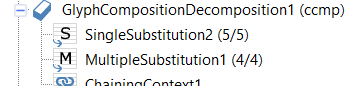
When there are two numbers for a substitution, I gather the second number indicates the total number of substitutions. The first number is sometimes the same but not always; I haven’t been able to figure out what that signifies.
The Code Editor button at the bottom of the OD window presents code for all of the OpenType Layout data. When inspecting a lookup, it’s very handy to be able open a Code Editor window for that lookup from the toolbar at the top of the OD window—nice! But if I select a feature in the left pane, that button is disabled. It could be useful to be able to inspect code for that feature and its associated lookups.
(Btw, thanks for OTLFD! Understanding a chained context lookup in OTLFD is much clearer than FEA, and much more concise than VOLT.)
I was trying to inspect the OTL data using a few different tools, including some other commercial products (although, not the latest version of another popular tool), plus something I created a long time ago that dumps a fairly low-level representation of GSUB data into Excel sheets. It was the latter that allowed me to figure out the problem with the chained context lookup, but mainly because it was the most familiar. (The key was noticing that the input sequence had length of 1, while the nested lookup was a ligature substitution, hence expected input of length 2.) Now that I’m more familiar with OpenType Designer in FontCreator, I can say it is the most convenient among the tools I was using for what I needed to do. So, thanks very much for a great tool!