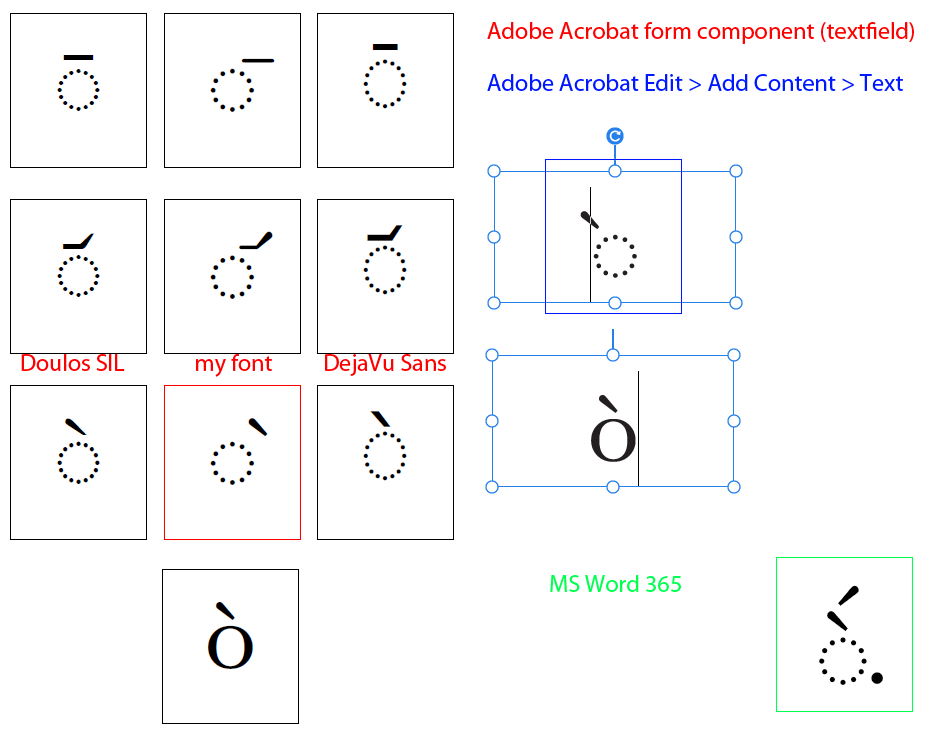
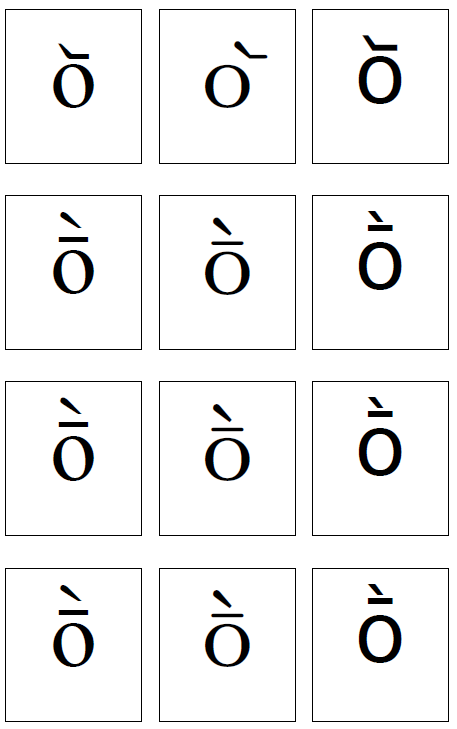
Some OT features in my font don’t work in Adobe Acrobat.
When I create a form component such as a textfield, MtB doesn’t show in several cases. I’d say the only combinations that do work are those of composite glyphs with standard Unicode code-points, e.g. ograve, oacute, etc. Other instances:
o/gravemacroncomb, /dottedcircle/gravecomb, etc.
ligature substitution, e.g. /dottedcircle/gravecomb => /dotted_grave [unmapped]
ligature substitution, e.g. /dottedcircle/gravecomb => /dotted_grave [mapped to PUA]
are ignored.
In other fonts, e.g. Doulos SIL and DejaVu Sans, the same features work just fine.
Moreover, if I add regular text (via Edit, not a form component), MtB doesn’t work either, but the position of the mark and caret shift to the left.
In order to see whether I’d be able to substitute /dottedcircle/gravecomb with /dotted_grave [mapped to PUA], I actually added some extra elements (acute & dot) - this works OK in MS Word, but not in any form in Acrobat (and no, just with grave or with grave & acute it didn’t work either).
NB: All features work in Preview and OT editor and Test font. I’m getting no error messages at any stage. I uninstall and physically delete all copies of my font, restart the computer, install the new version, and start Acrobat each time. From time to time I modify a different character just to test that the font version used is the latest one.
So what am I doing wrong? Any help greatly appreciated!
What you’re seeing is actually a limitation in Adobe Acrobat, not in your font.
Acrobat’s text engine inside form fields barely supports OpenType shaping. It does not properly apply GSUB/GPOS for combining marks, mark positioning, ligatures, or contextual substitutions. In most cases, only simple Unicode characters (like ograve, oacute, etc.) display correctly. Anything that requires real OpenType processing is usually ignored.
So why do Doulos SIL and DejaVu Sans appear to “work”?
They don’t really work because Acrobat applies their OT features. Instead, Acrobat has some fallback behavior for a few well-known fonts. For Doulos SIL in particular, the combining mark only appears correctly because the font uses a very large negative left side bearing on the mark glyph (–849). Acrobat doesn’t compute the correct attachment; it simply draws the mark relative to the base using the LSB. In your own font, your combining mark has LSB = –199, which is nowhere near enough to approximate proper mark positioning in Acrobat’s broken fallback shaper. That’s why the results differ.
So the difference is accidental:
Doulos SIL looks “correct” because of its extreme metrics, not because Acrobat understands the features.
Your font uses normal metrics and relies on proper OT mark positioning, which Acrobat ignores.
Everything works correctly in apps with a proper shaping engine (Preview, Word, FontCreator’s test window, etc.), so nothing is wrong with your font.
Unfortunately, Acrobat form fields simply cannot be relied upon for advanced OpenType behaviour. Only precomposed characters and some special hard-coded fallbacks work consistently.
From what I understand there is no reliable mark positioning in PDF forms, but I am not an expert in that particular field, so I welcome all feedback so we can keep this topic accurate.
Thank you for this! I was going slowly mad trying to find the particular wrong responsible for this behaviour in my font. I just checked DejaVu Sans and it also has very large negative LSB.
And in case anyone asks, your explanation also seems to apply to Adobe Illustrator.