I got it to work!!! Setting the caps-height to match the x-height put the accents where they belong. And, the 08/01/17 files gave the only result which had no unrecognized glyphs. However, they yielded no breakdown of the PUC in the outline … it appeared that the attempt to name glyphs in the PUA started in 06/21/2017 was abandoned.
It works for me. Not sure what is wrong at your end.
I finally eliminated the “undefined” status of the Ẽ … and I think it was by adding both e’s to the glyphlist.dat which did the trick.
Ẽ and ẽ were defined for Latin Extended Additional. If you want these Vietnamese glyphs in Petite Capitals too, you will need to add definitions to CompositeData.xml and UnicodeData.txt
Looking at the Low Profile Diacritics.xml, it seems to me that 183 middledot, 184 cedilla, 789 comma aboveright and 806 commabelow should also be included since these also need to be scaled down for the petite glyphs.
Edit the transform script to extend the range from 57365-57376 to 57365-57382. The Low Pofrile Accents transform script was not updated to match the updates I made to CompositeData.xml.
Middledot is not needed since CompositeData.xml uses lowprofiledotaccent (dot above) to compose L middle-dot. Petite Capitals with cedilla accent scale the cedilla accent by 80% so a lowprofilecedilla is not needed. Comma above right is not scaled for Petite Capital L commabove right so CompositeData.xml should perhaps be updated to scale that by 80% too.
Yes, I had examined CompositeData.xml to extract a new list of Low Profile Diacritics because I thought the middle dot was too large at one point in my thousand iterations! I noticed that 184 (middle dot) was missing from the collection of low profile diacritics so that had to be the cause … now I see that you are using 57377 in the Small capital l middle dot composition which is the scaled version of 729, dot accent. Anyway, now we have what I wanted, all three dots, above middle and below, the same diameter.
Yes, 789 commaaboveright and 806 commabelow both need to be scaled down somehow. Maybe use 57382 for both?
I do not know how you can keep track of this interconnected tangle of glyphs and files.
The truth is I don’t. I just fix problems when I come across them. I usually cannot remember why I made a particular decision five years ago, or why I changed something two years later to improve it.
It is better for users to make the changes that they want for their own needs. I added the lowprofilecommabelow for “Small capital l caron” with commaaboveright as a fallback glyph.
	<GlyphMapping>57382</GlyphMapping>
		<GlyphMapping>789</GlyphMapping>
I have updated CompositeData.7z on the Tutorial thread. I have also updated the tutorial thread on Glyph Transformations with a few new scripts and the updated scripts for Pow Profile Diacritics and Petite Capitals in the PUA.
I am sorry to be such a dummy but I have already spent 30 min. trying to find “…the tutorial thread on Glyph Transformations”
Please help
It’s right at the top of the Tutorials Forum now.
Thanks
I added the unicode ranges listed in your tutorial pdf (updating the Low Profile Diacritics range) to the Blocks.txt file. I find those PUA ranges in the outline view helpful. I noticed that the 06/21/2017 unicode.dat had an individual glyph listing (E000-F206) which is no longer in the 08/01/2017 listing. Do you know why they were removed? Are they accurate? (they seem not to be, listing the Low Profile grave @ E015) There are over 800 entries for the PUA that are missing in later versions. Beyond this PUA range, both data files continue with stuff which is of no interest to me presently.
While I have your attention … do you know why my .notdef boxed question mark glyph has stopped displaying for glyphs not found in the font? It worked for a while after I created it but no longer.
Damn, after posting that question about the individual listings in the PUA, I open FC to find that it is now listing the glyph names in the PUA which had gone missing. I have too many copies of these various files and somehow got them crossed up. I will have to sort them out, sorry.
After an exhaustive examination, I concluded: retain ArabicShaping.txt and Scripts.txt from UnicodeData AUG 2017.zip (file dates 08/01/17).
Overwrite Blocks.txt (the one I had just so proudly added to) and UnicodeData.txt with UnicodeData AUG 18 2018.zip (file dates 06/21/17)
These last two files had more complete listings than their “newer” counterparts!
Problem is, now small capital E tilde is no longer recognized!!!
Previously, I had added that glyph to CompositeData.xml and now it is not there!!! As far as I know, I have not touched this file since I added this glyph. I added it again and it is still unrecognized.
I am going nuts here!
CompositeData.xml
resolve multiple copies
Version 08 was Updated 25th August 2018
Version 07 was Updated 30th July 2018
The Current version has the E tilde (Ẽ) definition which I just added and version 08 lacks it.
Version 07 is missing a line @ 45323 which 08 has. ∴ the 08 version
is the most recent.
Action:
Leave current as active
Discard 07
Mark 08 as most recent
Keep a file containing all changes I make so I can add them to the next revision from FC
Hmmm… Somehow, I don’t think that this is going to work out very well!!!
Besides, I am not so sure that this is why Ẽ is no longer recognized. All this started with me revising Blocks.txt and Ẽ is present in Blocks.txt and UnicodeData.txt
So, I have one question, “Where are glyphs defined, exactly?”
Ok, one little step closer . . .
The problematic Ẽ must be added to UnicodeData.txt in TWO places. As it stands now, UnicodeData.txt is incomplete … at least in the area of the Petite Caps. Blocks.txt also needs extensive revision in order to properly display the PUA ranges. The only sources I have found are old PDF tutorials which are not “up to date”. Perhaps, CompositeData.xml can serve as a guide to the present configuration but, clearly, all three must be coordinated. What a job!
Why do you need support for Ẽ and ẽ. These are included in Latin Extended Additional, to complete the character set and support Vietnamese, etc.
Unless you’re creating a font for Vietnamese use, you don’t need all of these glyphs. If you want to support Vietnamese with Petite or Small Capitals, you will need to add a lot more glyphs with stacking diacritics and low profile stacking diacritics for these additional glyphs too.
Bhikkhu said:
Why do you need support for Ẽ and ẽ. These are included in Latin Extended Additional, to complete the character set and support Vietnamese, etc.
That seems to be a strange question coming from a typography maven!!!
Ẽ, ẽ is a letter in which the tilde indicates a nasal vowel. It is the 5th letter in the Guaraní alphabet and widely used in other Amerindian languages in Brazil, such as Kaingang. It is also found in Umbundu and perhaps in related Bantu languages.
Also, it is used in Emiliano-Romagnolo, a Gallo-Italic language whose two dialects are Emilian and Romagnol, which are spoken in the Northern Italian region of Emilia-Romagna, parts of Lombardy, Umbria, Marche, Liguria, Piedmont, Veneto and Tuscany and San Marino.
By my count, the Latin script is used in over 800 languages!
This is all beside the point … mainly, I added the petite Ẽ because it and the ẽ were already present in the original font.
While it is true that I am unlikely to have need of Ẽ in my ordinary correspondence, that can also be said about nearly all of the accented Latin characters. The main reason I came to FontCreator in the first place was because there was no support for Sanskrit transliteration characters in e-readers and the only solution was to embed fonts containing those characters. I also had occasion to create characters with what could rightly be called stacked accents for another project. I am using this particular font to explore the intricacies of creating petite characters which I thought would be useful in identifying the speakers in a work consisting of dialogue between multiple speakers. And, yes, it is unlikely that the Ẽ will be needed for this project. However, it is a legitimate character and it is in this font so why not include it and learn how to add new glyphs as well?
PS My idea of using petite caps for the speaker names in multi-person dialogues has not won my wife’s approval so, I may yet abandon the idea altogether. 

In examining the various locations where Ẽ and ẽ are “defined”, I found that in the UnicodeData.txt file, the entry for Ẽ as a petite capital seems to identify Ẽ as uppercase whereas the adjacent petite capital entries mark them as lowercase:
E9A5; PETITE CAPS W DIAERESIS;Ll;0;L;;;;;N;;;;;
E9BD; TITLING CAPS GERMAN CAPITAL S SHARP;Lu;0;L;;;;;N;;;;;
E9BE; PETITE CAPS GERMAN CAPITAL S SHARP;Ll;0;L;;;;;N;;;;;
E9DD; PETITE CAPS LATIN CAPITAL LETTER E WITH TILDE;Lu;0;L;;;;;N;;;;;
EA12; TITLING CAPS Y GRAVE;Lu;0;L;;;;;N;;;;;
EA13; PETITE CAPS Y GRAVE;Ll;0;L;;;;;N;;;;;
Could this possibly be the reason that the low profile accents are not being placed at the x-height level as they should be? I seem to recall that you said something to this effect, that petite capitals are treated as lowercase.
Well, I tried it out … I changed that UnicodeData.txt entry to:
E9DD; PETITE CAPS LATIN CAPITAL LETTER E WITH TILDE;Ll;0;L;;;;;N;;;;;
and when I ran the PCPU script, all of the accents were down to just above the x-height as they should be.
Yahooo!
I am going over the PCPU script in detail to see that it conforms to the small/petite capital code points in the CompositeData.xml. Apparently, code points were established for various non-letter characters,!$%&()?¡£¥¿, I suppose to be re-sized to match the small caps. In the original PCPU script, the Þ, SS and Ŋ were also included but they do not use code points in the small/petite reserve area (they use Titling Capital points). Not that it really matters I suppose but it is a bit untidy.
Talk about useless glyphs! Why on earth were these included? I question the inclusion of Πand others as well but at least they have their own code points in the small/petite reserve.
Enlighten me here … what was the rational behind the selection of which are in and which are out.
I misspoke, the SS and the Ŋ do have small caps code points so they can stay, I guess 
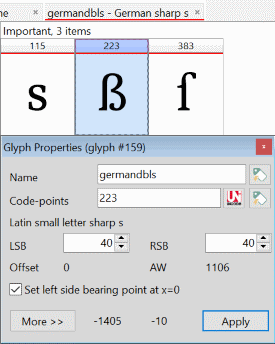
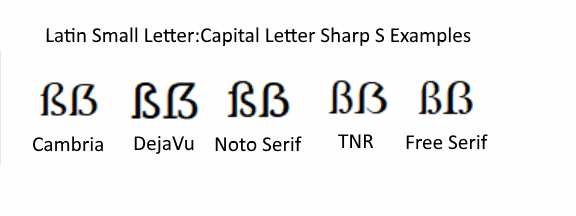
I am a little confused about the Latin Small Letter Sharp s (U+00DF) and the Latin Capital Letter Sharp S (U+1E9E). The Latin small letter sharp s generated by complete composites resembles the uppercase small sharp S and it has the height of a capital letter.
223-02revised.png
Mapped at 223, the first appearance in CompositeData is identified simply as <! – ẞ. When 223 is mapped to 7838, it is identified as <!-- German Capital Sharp s →. And lastly, when it is mapped to 59838 as a petite capital, it is identified as <!-- Small capital german dbls →.
This last reference is a throwback to the time when the capital version of the sharp s was a capital double S. This is confirmed by yet another mapping to 58223 where two 58115s are composited and identified as <!-- Small capital German s → and the 58115s are uppercase Ss.
58223.png
Bottom line: there is no Latin small letter sharp s … what you find @ code point 223 is the Latin capital letter sharp S. The double S capital version of the sharp s is obsolete.