Since updating to version 16, when adding points, a right click does not add a curved point. We cannot find any setting to make this happen. In addition, an arrow now appears at the start of creating a glyph using the points editor.
In FontCreator 16 this behavior has changed.
The Pen Tool now draws Bézier outlines point by point:
- Click to add an on-curve point without handles.
- Click and drag to add a point with handles, which creates a curved segment. The direction and length of the drag determine the handles.
- You can click an existing point and move it
You can also hold Shift while placing the next point to constrain it to a 45° angle relative to the previous point, which is useful for clean horizontal, vertical, or diagonal segments.
To close a path, click the first point of the contour.
The arrow/triangle you see is intentional. Since version 16 we no longer show separate start and end point indicators; instead, a single triangle indicates the contour direction.
Hi Erwin. Thanks. The Bezier curve is not as easy to use. Please could we have the option to use either the Bezier curve or just have the previous method?
The right-click option only works with quadratic contours, so make sure the setting is aimed at quadratic:
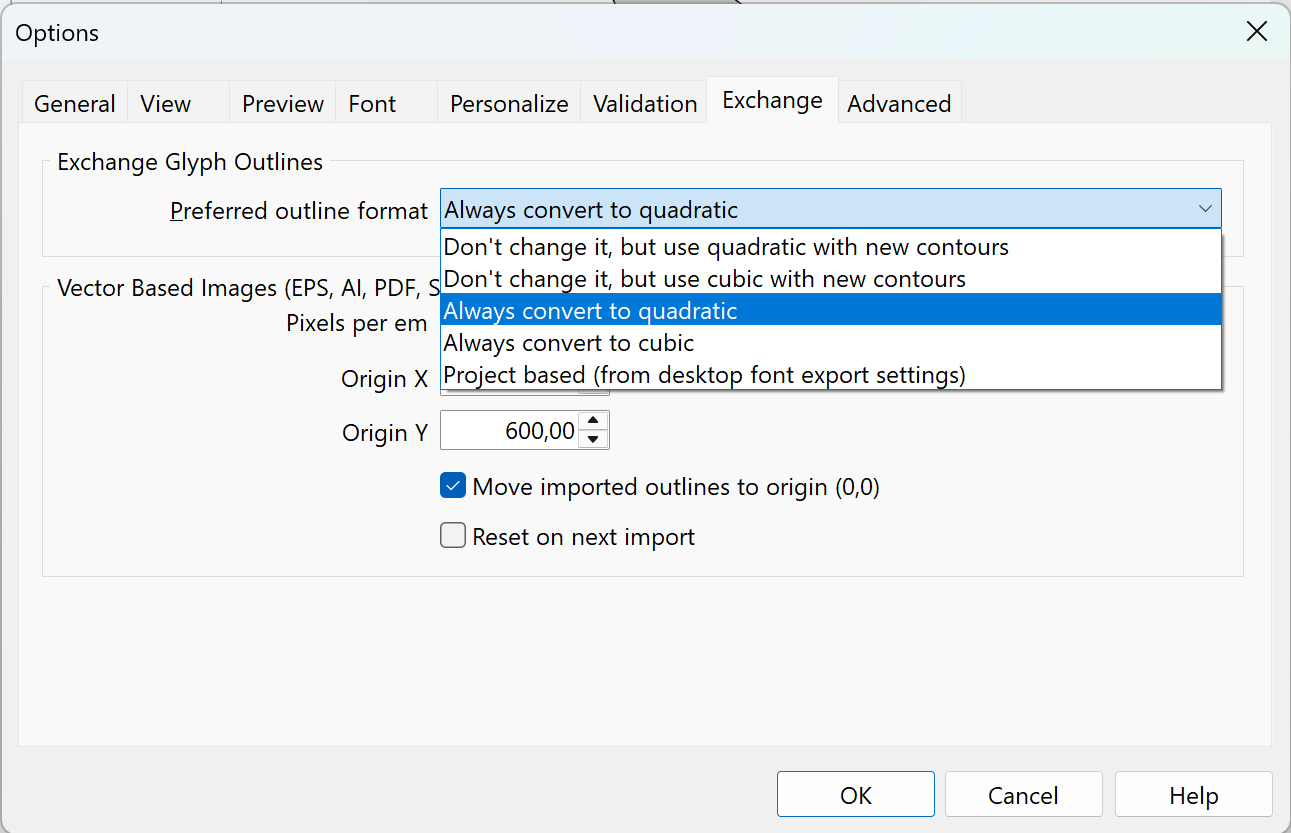
Thanks Erwin. The new version must have defaulted to Always Convert and I hadn’t need to change it before.