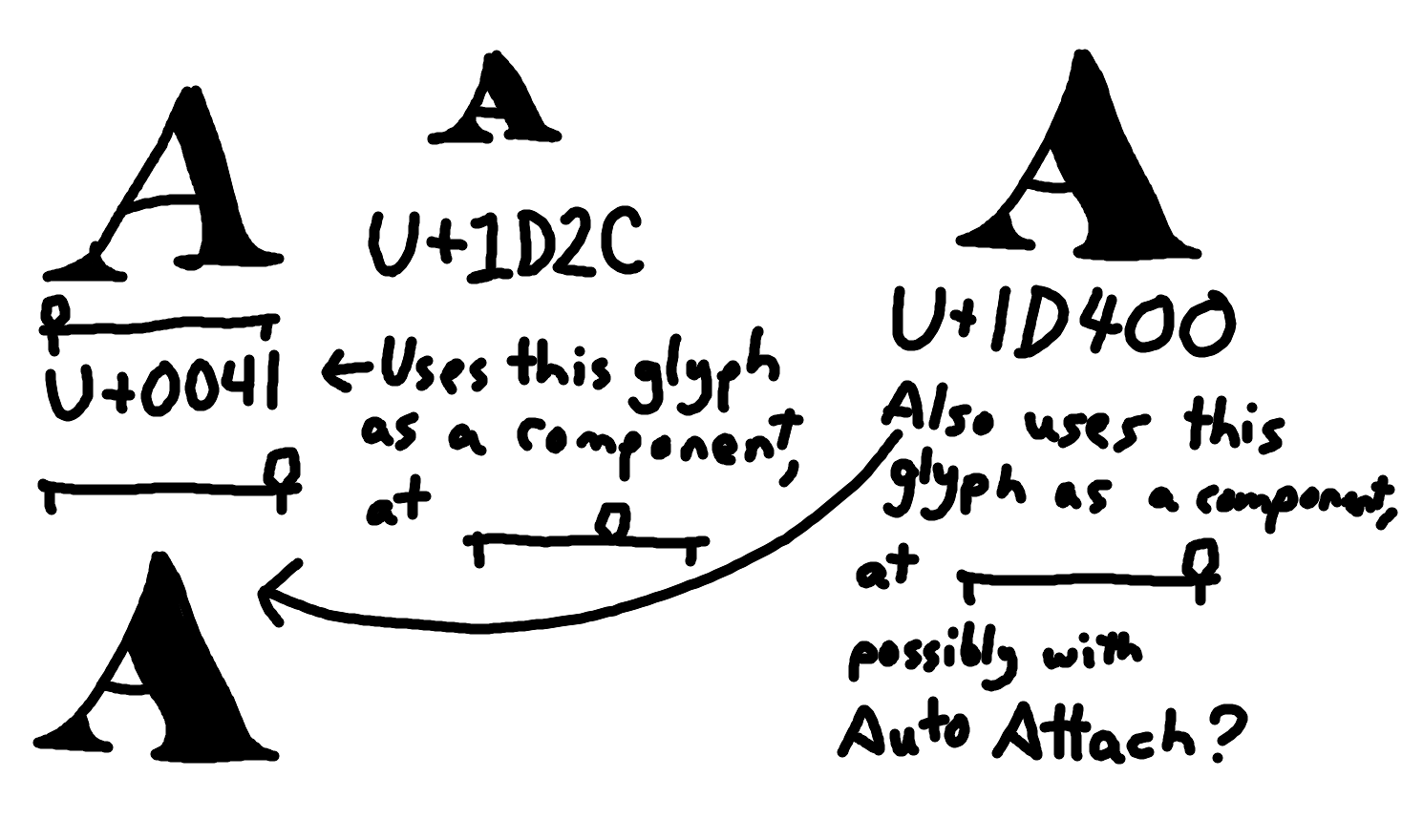
I have a rather complicated question/request that I’m not sure would be feasible, if not, that’s ok.
I’m somewhat of a novice at variable fonts and smart components, and I would like to be able to make superscript/subscript characters using the weight axis to get them the right amount of thickness to look nice as superscripts/subscripts.
Thing is, since the usual weight axis cannot be used as a smart component axis, I would need to make two identical bold versions of each character–one for the regular weight axis (as I do still want to be able to have a regular weight axis), and one for the smart axis. Since there’s no way to “sync” these two axes (such as having one be used as a component directly into the other with Auto Attach), I need to just manually make them identical, which wastes both effort and filesize, and I’d have to change both of them if I wanted to change the bold glyph.
This is really complicated to explain but what I’d like to be able to do is define, say, ᴬ, as the A glyph with its weight axis set to about 60% of the way from regular to bold, with anchors and bearings intact, but shrunken down to about 62.5% of its size and raised up, and it would live update if I changed either the regular or bold of the A glyph. Ideally, I’d like the anchors to auto-update too, but since it would be shrunken, I don’t think it would be possible to keep an Auto Attach on it. Which should be okay, I may be able to live without the anchors auto updating, the main issue is I don’t want to have to make two duplicate heavy-weight A layers that are completely unattached from each other. I’d also like the character 𝐀 (mathematical bold capital A) to be synced with the bold master of regular A.
Again, I’m not sure if there’s a feasible way to implement something like this, or even if other font softwares have anything like it. If not that should be okay, but I hope I was able to explain what I want without it being too confusing, feel free to ask me questions if you need me to clear anything up.
Before going into Smart Components, I suggest you first look at Tools > Glyph Transformer. FontCreator includes a script named Superscript.xml, which creates superscript figures by scaling the original figures and applying a bold transformation.
That script is useful because it shows the basic workflow:
start with the original glyph;
scale it down;
move it up;
compensate the weight, so it does not become too light.
For many fonts this can give a good first result, especially for figures. For letters, and also for high-quality superscript/subscript glyphs, you will usually still want to review and adjust the outlines, spacing, and vertical position manually. Simply scaling and emboldening the normal glyph does not always look right.
Smart Components can still help reduce duplication. For example, you can add a smart axis to A and use A as a Smart Component inside ᴬ, then scale and position it. That keeps the glyph linked to the source design, while still allowing you to make further corrections where needed.
For mathematical bold characters such as 𝐀, a component-based approach is more straightforward, because it only needs to follow the bold design and does not also need to be reduced in size.
So my advice would be: first try the Glyph Transformer superscript script to understand the transformation, then decide where Smart Components make sense to keep related glyphs easier to maintain.
I know of Transformer and indeed did use it for this, however its results are not always satisfactory, though I can use it as a good workaround to get the anchors on superscript glyphs.
Really my issue is that I want the emboldening Smart Axis and the actual weight axis to be the same, or at least synced in a way, to save space and time, is there a way to do that?
This is a really interesting problem, and I think I understand what you’re trying to achieve. You essentially want the superscript A to be a live derivative of the normal A: interpolated to a particular point on the Weight axis (say ~60% toward Bold), then scaled down to ~62.5% and shifted upward, while still retaining its bearings and ideally its anchors.
The important part is that you don’t want to create a second, manually maintained “bold” A just for the smart component. You want something like:
A (Regular ↔ Bold) → superscript A = A at ~60% weight + scale/position transform
so that changes to either the Regular or Bold master automatically propagate to the superscript. And similarly, 𝐀 should be tied directly to the Bold master of A.
I was wondering about this too, and it looks like newer versions of Glyphs may actually get fairly close to this kind of workflow. Glyphs 3.4 specifically mentions improvements to using font axes as smart properties, including reusing regular glyphs as smart components when their axes match the font axes.
The general Smart Components system is also designed to let a component have its own variation properties, so in principle a setup like this seems possible without maintaining completely separate outlines.
For superscripts/subscripts, I think this is especially worthwhile because simply scaling the regular glyph down usually makes it optically too light; the smaller glyph generally needs some weight compensation.
I’m curious whether there’s a clean way in Glyphs to combine the font’s Weight axis with a Smart Component/local scaling and positioning like this, while keeping the source glyph completely live. If anyone has a practical setup for this, I’d love to see it.
The trick is to give A’s smart weight axis its own layers at both masters, Regular and Bold. Once the smart extremes exist at each master, a component referencing A can set a single smart-weight value and it’s applied all the way along the real Weight axis — so the two axes move together and edits to either master propagate through. In the sample the superscript A is A at 60% scale with a bit of weight compensation (smart weight ~110 on an 80–140 range), and it still tracks Regular→Bold. The mathematical bold A is tied the same way, just pinned toward the Bold end.
And yes, I fully agree the compensation is the whole point. A plain 62.5% scale-down reads too light every time; the smaller glyph needs the extra weight, which is exactly what a plain component can’t give you and this setup can.
The one honest tradeoff: on export the smart components are decomposed, so the superscript and math-bold become their own interpolating outlines rather than reused components.
Here is another update that has several improvements related to AutoAttach and Smart Components. Be aware it is not an official release, so things might change or break.