Hi, I created a Roman and an İtalic variable font. When I exporting the italic it’s exported as the same name as Roman font. How can fix the name cknflict? Affinity and Indesign does not recognize italic variable style. I sent the files. Thanks.
Thanks for sending the files, that made it easy to find the cause.
Your Italic font isn’t a variable font. It was exported as a single static Italic, which is why Affinity and InDesign don’t offer an italic variable style, and why Windows shows no instances for it. The font itself is fine; it’s a setting in your Italic project.
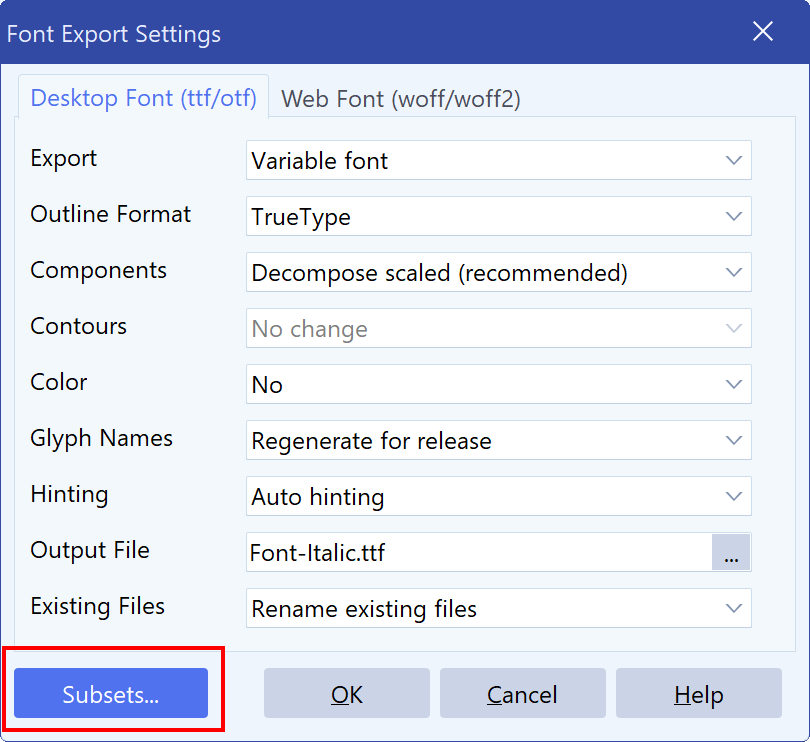
In the Italic project’s export settings, under Subsets, there is a variable font entry named “Italic” without any axes. When an entry has no axis ranges, every axis is fixed at its default value, and the result is a static font. You don’t need Subsets for this: you already have separate Roman and Italic projects, and your Italic project is set up correctly, with instances named Italic, Medium Italic, Condensed Italic and so on.
There’s a second issue. Your Italic project started as a copy of the Roman project, and it still remembers the Roman’s output file, YourFont-Regular.ttf. That’s why the Italic was exported under the Roman’s file name.
To fix it, open the Italic project and:
- Choose File > Export > Desktop Font As (ttf/otf)…
- Make sure Export is set to Variable font.
- Click Subsets…, select the “Italic” entry, delete it, and click OK.
- Change the output file name to, for example, YourFont-Italic.ttf.
- Click OK to export.
You’ll then get a variable Italic with the same family name as the Roman (YourFont VF) and the style Italic, with all its Italic instances. Uninstall the old Italic before you install the new one, and restart Affinity and InDesign so they pick up the change.
We’re also improving FontCreator so this can’t happen unnoticed. In the next update, FontCreator warns you instead of exporting a static font when a Subsets entry has no axis ranges. A project saved as a copy for another style will also no longer reuse the original font’s file name.
1 Like
Thank you for your help.