I added BOLD to my font with the Transform dialog under Effects. After that, some of my fonts look like this? What happened and can I get it back to no orange?
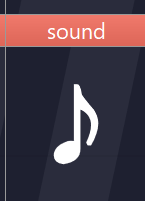
What you’re seeing isn’t part of the glyphs themselves: the red (sometimes it can look orange depending on the theme) header in the Font Overview is a warning that those glyphs have compatibility issues between masters/layers, so interpolation will fail in a variable font.
This often happens after using Effects → Transform (Bold/Embolden), because it can change the structure of outlines (number/order of contours and points), and variable fonts require the layers to match.
To fix it:
- Open View → Panels → Masters and Layers (Ctrl+F6).
- In Font Overview, select the glyphs (or select all).
- Click the Fix toolbar button at the top of the Masters and Layers panel.
- If some glyphs stay red: double-click a red glyph, then enable Show compatibility issues (also on the Masters and Layers panel) and adjust the outlines until both masters have matching contours/points (and for composites: matching components).