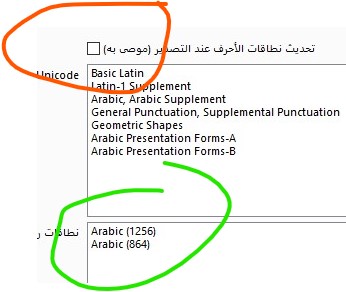
I’ve been thinking about this issue as well. The character range determines how software recognizes the font’s language. In China, when designing fonts, we usually set this range to Chinese. As a result, software like Photoshop will categorize the font under Chinese and display the Chinese name if it has been set. If no Chinese name is set, the English name will be shown instead.
I think your issue might be that the software recognizes the font as English, but your font doesn’t have an English name configured, which causes a display or reading issue. Just my personal opinion.
لقد فكرت في هذه المشكلة أيضًا. نطاق الحروف هو ما يحدد كيفية تعرف البرنامج على لغة الخط. في الصين، عند تصميم الخطوط، نقوم عادةً بتعيين هذا النطاق كلغة صينية، وبالتالي فإن البرامج مثل Photoshop ستصنف الخط ضمن الخطوط الصينية وتعرض الاسم الصيني إذا تم تعيينه. وإذا لم يتم تعيين اسم صيني، فسيتم عرض الاسم الإنجليزي بدلًا منه.
أعتقد أن مشكلتك قد تكون أن البرنامج يتعرف على الخط على أنه إنجليزي، ولكن لم يتم تعيين اسم إنجليزي للخط، مما يؤدي إلى مشكلة في العرض أو القراءة. هذا مجرد رأي شخصي.