Help with ligatures, etc.

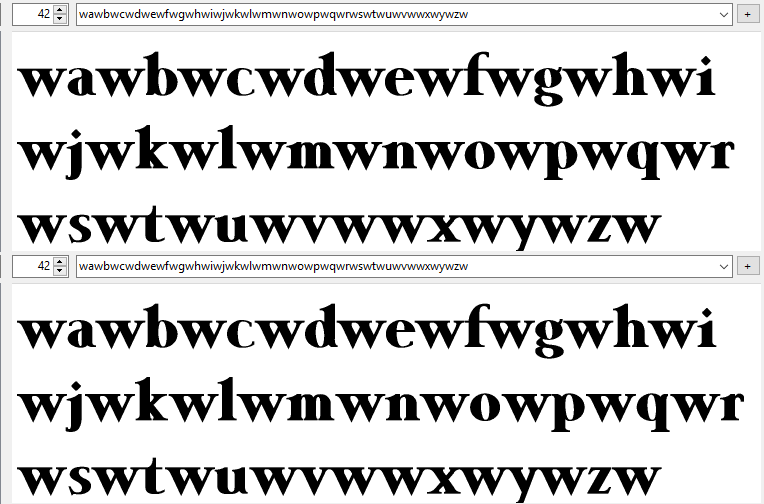
Not all possible permutations need to be kerned. I have been using the attached file to see which pairs need it (especially the alphabet sets, and brackets). With lowercase w, for example, only “wd” needs kerning, and pairs “mw” and “pw” are also kerned.

wawbwcwdwewfwgwhwiwjwkwlwmwnwowpwqwrwswtwuwvwwxwywzw
Kerning Test.gif
My black letter font has far fewer pairs than most other fonts.

Paste each line into the OpenType Designer preview and toggle kerning on and off to see where more pairs are needed. If there are already pairs, but no movement is easily discernible, they’re probably too small to be worth having. Anything below 20 funits is not necessary.

The test file also highlight if a glyph needs different side-bearings. Always fix those before kerning.
Sequences to adjust kerning.txt (8.19 KB)

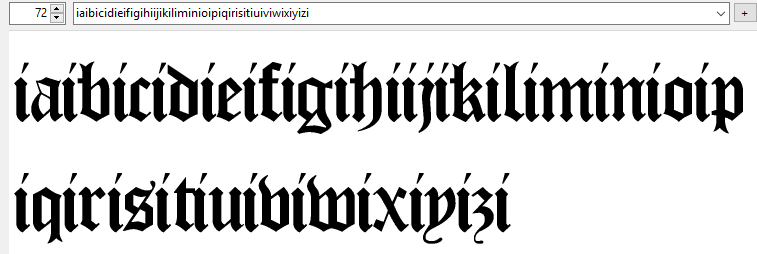
My black letter font has zero pairs with lowercase i, including none with Uppercase. The left side-bearing could perhaps do with a little bit more space, but black letter fonts were often tightly spaced to save on expensive vellum.

Oh, that definitely helps – thanks for that! I have something similar that I got years ago from typophile.com, but your seems to have a lot more kerning pairs to check out.

So I guess the answer to my question, with regard to getting autokerning to include the glyphs in the PUA, it’s just not possible to get FontCreator to include those? I realize that there’s still manual kerning that has to be done after that anyway, but at least that would give on a start – it’s beyond me why FC doesn’t allow that, even if it were a checkbox option to include, or not include, the PUA glyphs.

My black letter font has far fewer pairs than most other fonts.

Well, that’s interesting! If anything I might have thought that it needed more? Like, with my font – which I see still needs a LOT of work, the more that I look at it :frowning: – it’s all the various longs (and other) ligatures which would seem to be creating a fair bit of extra work for me. Even using that text file with the various kerning pairs to check out, I still have to adapt that in order to kern a whole slew of additional ligs and other things – stuff like double-longs, etc.

The test file also highlight if a glyph needs different side-bearings. Always fix those before kerning.

That’s one thing I have no idea about, really – as you agreed, blackletter fonts like this should be set quite tightly, but exactly how much or how little I just don’t know.

And then there’s autometrics, to boot, where it asks you to specify the “glyph spacing factor.”

Can you explain what exactly the difference is between how much space you give between the glyph and it’s side bearings, and how much “glyph spacing factor” you give it when you run autometrics? I don’t quite get that, it seems like one is doing the same thing twice.

black letter fonts were often tightly spaced to save on expensive vellum.

Well, that’s not entirely correct, actually. In the days of scribes, when they were copying texts by hand, I can see where that might have been the case, but by the time printing with movable type came around in the 15th century, the papermaking business was booming in Europe, and vellum wasn’t really used much any more except for particularly special or expensive books. If Gutenberg and his successors had emulated that tight spacing, I would rather suggest that it was more of a continuation of style, not due to the expense of vellum.

At any rate, it certainly does look like I have my work cut out for me still with this font – I started it a decade ago, and it might be another decade before I finish, at this rate. :open_mouth:

If you include glyphs from the PUA in your kerning classes and/or kerning pairs, then Autokern will use them.

Optical Autometrics calculates the side-bearings for a limited number of glyphs automatically. The glyph spacing factor merely decides how tight the spacing will be. See this thread on Optical Metrics

Oh. I think perhaps I see the mistake I made here – I had added in all those various ligatures as “characters” rather than as “classes,” because each and every one of them were rather unique (being double, sometimes triple, “characters”), but then when I ran autokern it didn’t add in any adjustment pairs for any of them.

If I understand what you’re saying, though, if I add each of those ligs in as “classes” rather than as “characters” – even if each of those classes only contains one character, then autokern will then create adjustment pairs for each of them (in combination with all other glyphs, wherever appropriate)?

Can you explain what exactly the difference is between how much space you give between the glyph and it’s side bearings, and how much “glyph spacing factor” you give it when you run autometrics? I don’t quite get that, it seems like one is doing the same thing twice.

Optical Autometrics calculates the side-bearings for a limited number of glyphs automatically. The glyph spacing factor merely decides how tight the spacing will be. See this thread on > Optical Metrics >

I guess my confusion here is that if metrics adjusts the spacing between characters (and, as you point out in that thread, the latest versions of FC have a preview available, which certainly helps a lot), then what’s the point of even having side bearings at all in the first place? Like, when it comes to type design, what’s the point of it at all, if that gets “adjusted” later on when one figures out the metrics anyway? Why not just give everything L/R bearings of 0 (zero) and then let the metrics figure out the spacing between characters?

I feel like there must be something really rather basic and simple to this – and yet somehow I don’t seem to “get it.” :frowning:

The better you set the left and right side bearing for each individual glyph, the fewer kerning pairs are required for the special cases.

Oh. Well, then how does one decide what those values should be for each character? As I mentioned earlier, I just set my L/R bearings to 62 for the entire font (except for the space, which I set to 123) – I had no idea that each character needed to have the bearings set individually.

Eek – this type design thing is getting scarier by the day! :wink:

Autokern in the OpenType Designer will calculate adjustments for existing pairs, whether they are pairs of kerning classes or individual glyphs. See my earlier post. Do not run Autokern from the Tools menu more than once.

The Optical Metrics feature is not available in the Home Edition. Look at any font to see why side-bearings are not equal, and rarely zero. The value of side-bearings depend on the shape of the glyph.

The bearings in the attached font were generated with Optical Metrics.
New Black Letter.fcp (31.9 KB)

Yeah, I learned that lesson (to not run autokern from the tools menu repeatedly. :wink:

The Optical Metrics feature is not available in the Home Edition. Look at any font to see why side-bearings are not equal, and rarely zero. The value of side-bearings depend on the shape of the glyph.

The bearings in the attached font were generated with Optical Metrics.

I think I just suddenly had a brainwave and finally got it (I hope). All this time – for all these many years – I’ve been confused about setting the bearings, and the metrics, and kerning. I’ve always thought that bearings and metrics were two separate (but similar) things.

But I gather now that the metrics IS, in fact, the bearings??? That’s, like, a revelation to me! Ha ha, all this time, I thought metrics were some mysterious, unseen bit of code that was in the font somewhere, that you didn’t “see” when you looked at it, even closely – which is why I couldn’t understand why one has to do both (when there is not “both,” because they’re the same thing). :laughing:

If I am understanding this correctly (finally!), then I suppose that my way of doing things – setting all the bearings on the entire font to 62 (or whatever) first, and then running autometrics, is rather pointless? I guess I can just skip that first pointless step and simply run autometrics, no matter how screwy my bearings might be (like, from having added in a bunhc of new glyphs or something)?

Seriously, I’m embarrassed over how clueless I’ve been – but this is indeed a true revelation for me. I just hope I understand it correctly now! :wink:

Not to be confused with the Matrix. :laughing:

There are also the font metrics (Tools menu, show metrics lines), which are calculated and not set. It is the size and design of the glyphs that determines the position of x-height, Cap-Height, TypoAscender, TypoDescender, WinAscent, WinDescent.

Sometimes I think that’s actually where I go to whenever I fire up FC. :wink:

There are also the font metrics (Tools menu, show metrics lines), which are calculated and not set. It is the size and design of the glyphs that determines the position of x-height, Cap-Height, TypoAscender, TypoDescender, WinAscent, WinDescent.

Hmm… is that in the latest version of FC (which is what I’m using)? I don’t see that. In the Tools menu, apart from AutoMetrics I see a thing that says “Metric Options,” but that’s more like a “View” sort of menu, i.e. re what’s visible as you work on glyphs. I don’t see anything for “calculating” what the values for those things are??? I looked around elsewhere for anything like that and couldn’t seem to find anything.

That’s the one. The CapsHeight is calculated from the Capital H. You can guess which glyph is used to calculate the x-height. The Metrics calculations are found in Font Properties, Metrics.

Yeah, but like I mentioned, that’s just a “view” sort of menu – I’m not sure why you directed me to that one, as it gives no information, and I can’t see any reason to turn anything off in there.

The Metrics calculations are found in Font Properties, Metrics.

Ah, yes, now that you directed me in there, I recall stumbling across that before, and without really knowing “why” I did run the two “calculate” buttons in there (and assumed at the time that my having done so was a good thing). :wink:

There’s one option in there for choosing between “Minimum” and “Maximum” – it was set to calculate based on the latter, and so I just left it like that. I have no idea if that’s the better option of the two. In my head, it rather makes sense to me to calculate it base on the maximum – I’m not sure what contexts one would want to calculate it based on minimum. I would think (if I understand this correctly) that it would be dumb to calculate it based on the minimum, because then you would have parts of certain characters (ascenders or descenders) “disappearing” when they display on one’s page – I’ve seen that happen with some really crappy freebie fonts before, and I can only assume that that’s the issue that occurred there.

PS. On a TOTALLY unrelated note to type design, I got curious about “who you are” – i.e. what you do, etc. – and googled you, and discovered that you’re a Buddhist monk, and that you design fonts for Buddhist publications. How very cool! I’m not as serious (or “devout,” perhaps might be a more accurate term) about my own spiritual beliefs, as my own interest is in mysticism regardless of tradition – when people ask me what I believe, I tell them “everything” (ha ha), and in a way that’s true, I see the “fundamental truth” in the mystical roots of all spiritual traditions, which is also reflected in science (in particular physics, but also in biology and various other sciences as well). However, Buddhism and other eastern traditions, along with Native American traditions, has been a HUGE part of my own personal growth and, indeed, psychological healing (I’ve struggled for many years with PTSD-related issues). I’m totally digressing off-topic here, of course, but that was a nice, rather pleasant surprise, to discover what you do, what you’re into. :slight_smile:

Hmm… in the last few days I’ve gotten a couple email notifications that there’s replies to this thread, but then when I come to read them there’s nothing new here! The other day I got one that said that there was a new reply from someone named “Alfred” (if I remember the name correctly), and then this morning I got one saying there was a reply from Erwin Denissen. Both times I came and looked, and nothing new was here.

Where are these supposed-replies disappearing to??? :open_mouth:

Sorry for the confusion. I replied twice to test some reported forum issues, and removed the posts afterwards.

Ah, okay – thanks! Now my world makes sense again. :wink:

Hmm… this didn’t work. I spent HOURS this morning cleaning up all sorts of crap in my font, improving various characters, etc., and then added classes for each and every ligature (etc.) that’s in my PUA, then ran autokern…

…and there’s no pair adjustments for any of those PUA glyphs at all, all those classes still come up as “not used.” If there is a way to automate this task, then I don’t know how – I must be doing something wrong. :frowning:

You said “If you include glyphs from the PUA in your kerning classes and/or kerning pairs…” and I take “and/or” to mean that if I only create classes for those those various PUA glyphs, then by running autokern FC will automatically create adjustment pairs on its own.

Did I misunderstand? If I have to do it manually, one pair adjustment at a time, then what a pain! Like, I’ve got a ligature for longs+h, and just think of all the possible combinations that can go with that – not just virtually every single lowercase character, but every accented variation of those, to boot – and I have many different other ligs, too.

And then I also have to go back to many (if not most) other lowercase characters and add pair adjustments for each of those ligs as well. I don’t understand why there isn’t a way to automate this, so that I can do in seconds what will otherwise take me a whole day (or something) to do. :frowning:

Never mind my last reply here – I think I’m finally starting to get it (I think). :wink:

I’m mystified by an issue I’m seeing, though…

If only to use this as an example, I started (but haven’t finished) creating kerning pairs for each of those various ligs in my PUA, one of which is a double-longs (“ſſ”) lig. For whatever reason, before doing this, there was way too much space between that lig and whatever character came after it (and also before, but mostly the issue seemed after). I did check my bearings (and adjusted them), and then after creating kerning pairs everything looks fine in the font preview, and when I install the font on my system and create a graphic (with text) in Photoshop, the kerning comes out just fine…

…but when I embed the font into an ebook, for some mysterious reason it’s like the kerning for that lig (and whatever other glyph) just isn’t there, there’s still way too much space.

If that kerning pair comes out just fine in the font preview, and then displays fine when using the font in Photoshop, why on earth would that kerning “disappear” when the font is used in an ebook (where everything else – all ligature lookups and whatever other kerning made on more “regular,” non-PUA characters – seems to work just fine)?

Any ideas? As I mentioned in another thread here just now, when trying to validate my script in the code editor I get a TON of “Class overlap detected” error (or warning) messages – could that be why, something funny going on in there? I’m clueless. :open_mouth:

Class overlap errors will not prevent the font from being exported, but the classes will all be flattened to single adjustment pairs. If the e-book does not support GPOS kerning then try including a legacy kern table.

There are a great many applications out there that do not kern or do not support any of the open type features. Some do nothing more than a very basic rendering of the text.

I thought about adding ligatures to substitute for proper kerning but the problem is that the applications which don’t kern are generally the ones that don’t do ligatures either. :frowning:

But in general applications where the function of the program is to present text properly rendered (word processors & desktop publishing) do have better support for open type features. I don’t know about e-book compilers. One would have thought that they would do their job properly but there are no guarantees.

As Bhikkhu Pesala said including a Legacy Kern table is probably your best option at this point, it will make the font bigger but older applications are more likely to support that type of kerning if they support kerning at all. Microsoft Word until very recently only did kerning if the font had a legacy kern table.